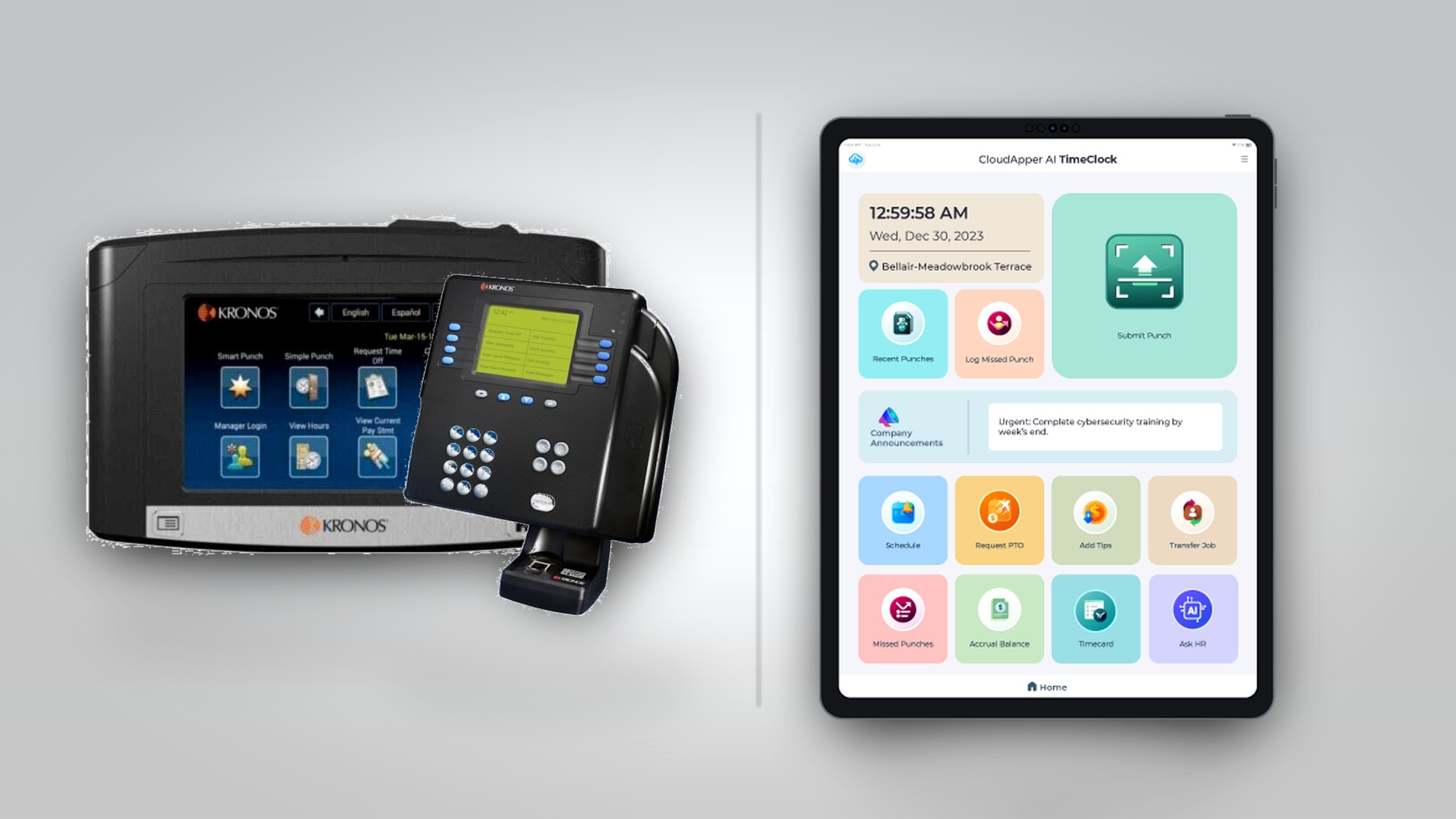
For organizations that have relied on UKG (formerly Kronos) workforce management solutions, the Kronos 4500 and 9100 time clocks represent familiar, proven technology that has served countless workplaces for years. These durable hardware terminals have been the backbone of time and attendance operations across healthcare facilities, manufacturing plants, retail stores, and numerous other industries. Their reliability and straightforward functionality have made them trusted components of workforce management infrastructure.
As organizations evaluate their current time clock deployments and plan for the future, understanding both the value of these established systems and the modern alternatives available becomes essential. Whether you’re maintaining existing Kronos 4500/9100 devices, planning replacements as hardware ages, or expanding time clock coverage to new locations, exploring all available options ensures you make informed decisions that balance functionality, cost, and operational requirements.
This comprehensive guide examines the Kronos 4500 and 9100 time clocks and explores situations where alternative solutions like CloudApper AI TimeClock might better serve specific organizational needs. For HR leaders managing UKG Ready, Pro, or Pro WFM environments, understanding your complete range of time clock options enables strategic decision-making that optimizes workforce management capabilities while managing total cost of ownership.
Understanding the Kronos 4500 and 9100 Time Clocks
The Kronos 4500 and 9100 time clocks earned their reputation through years of reliable service in demanding workplace environments. These hardware terminals brought sophisticated time and attendance capabilities to organizations long before cloud-based systems became mainstream.
The Kronos 4500: Proven Reliability
The Kronos 4500 time clock established itself as a workhorse terminal for basic time and attendance needs. Organizations valued its straightforward functionality and durability:
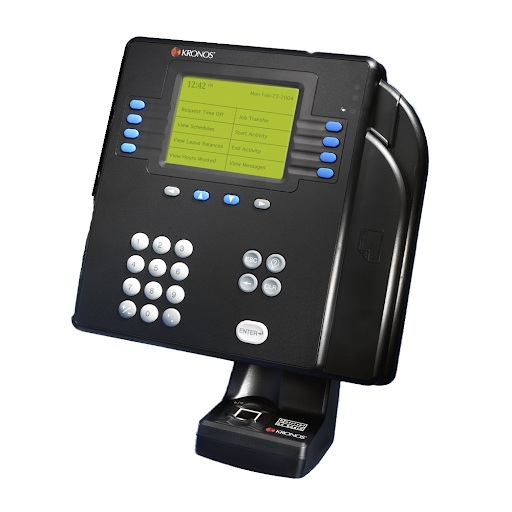
Simple Operation: The 4500 provided essential time clock functionality through a keypad interface where employees entered their badge numbers or employee IDs to record punches. This simplicity meant minimal training requirements and reliable operation even in challenging environments.
Durable Construction: Built to withstand workplace conditions, the 4500’s rugged design made it suitable for manufacturing floors, warehouses, loading docks, and other demanding environments where equipment durability matters.
Badge Reader Support: Beyond manual entry, the 4500 supported proximity badge readers, allowing quick clock-in through badge scanning rather than number entry.
Display Feedback: The LCD display provided employees with immediate confirmation of their punch, including timestamp and punch type, ensuring transaction confidence.
Proven Track Record: Years of deployment across thousands of organizations demonstrated the 4500’s reliability and longevity. Many organizations operated these devices for a decade or more with minimal maintenance.
The Kronos 9100: Enhanced Capabilities
The Kronos 9100 represented an evolution in time clock technology, offering expanded capabilities while maintaining the reliability that organizations valued:
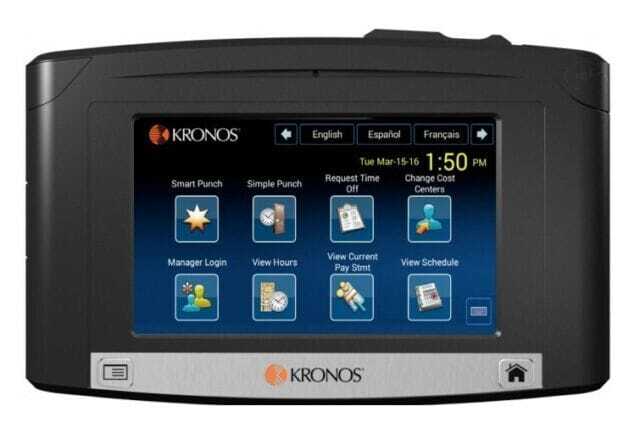
Color Touchscreen: The 9100 introduced a color touchscreen interface that enhanced usability and enabled more sophisticated employee interactions beyond basic punching.
Biometric Authentication: Many 9100 configurations included fingerprint scanning capabilities, helping prevent buddy punching and ensuring accurate employee identification.
Enhanced Employee Self-Service: The larger display and touchscreen interface enabled employees to perform additional functions such as viewing schedules, checking balances, or requesting time off directly at the time clock.
Improved Integration: The 9100 offered enhanced integration capabilities with Kronos (now UKG) workforce management systems, supporting more sophisticated data exchange and real-time connectivity.
Communication Display: Organizations could display messages, announcements, or important information to employees during clock-in, improving workplace communication.
Ethernet Connectivity: Built-in Ethernet connectivity provided reliable network connection for real-time data transmission to Kronos systems.
The Legacy of Kronos Time Clocks
Both the 4500 and 9100 served organizations exceptionally well during their respective eras. They brought professional time and attendance capabilities to workplaces, improved payroll accuracy, reduced time theft, and provided the reliable operation that workforce management requires. Many organizations continue operating these devices successfully, benefiting from their proven reliability and the comfort employees have with familiar systems.
However, as with all technology, the landscape of workforce management has evolved significantly. Cloud-based systems, mobile technology, artificial intelligence, and changing employee expectations have transformed what’s possible and what employees expect from workplace technology.
When Organizations Seek Time Clock Alternatives
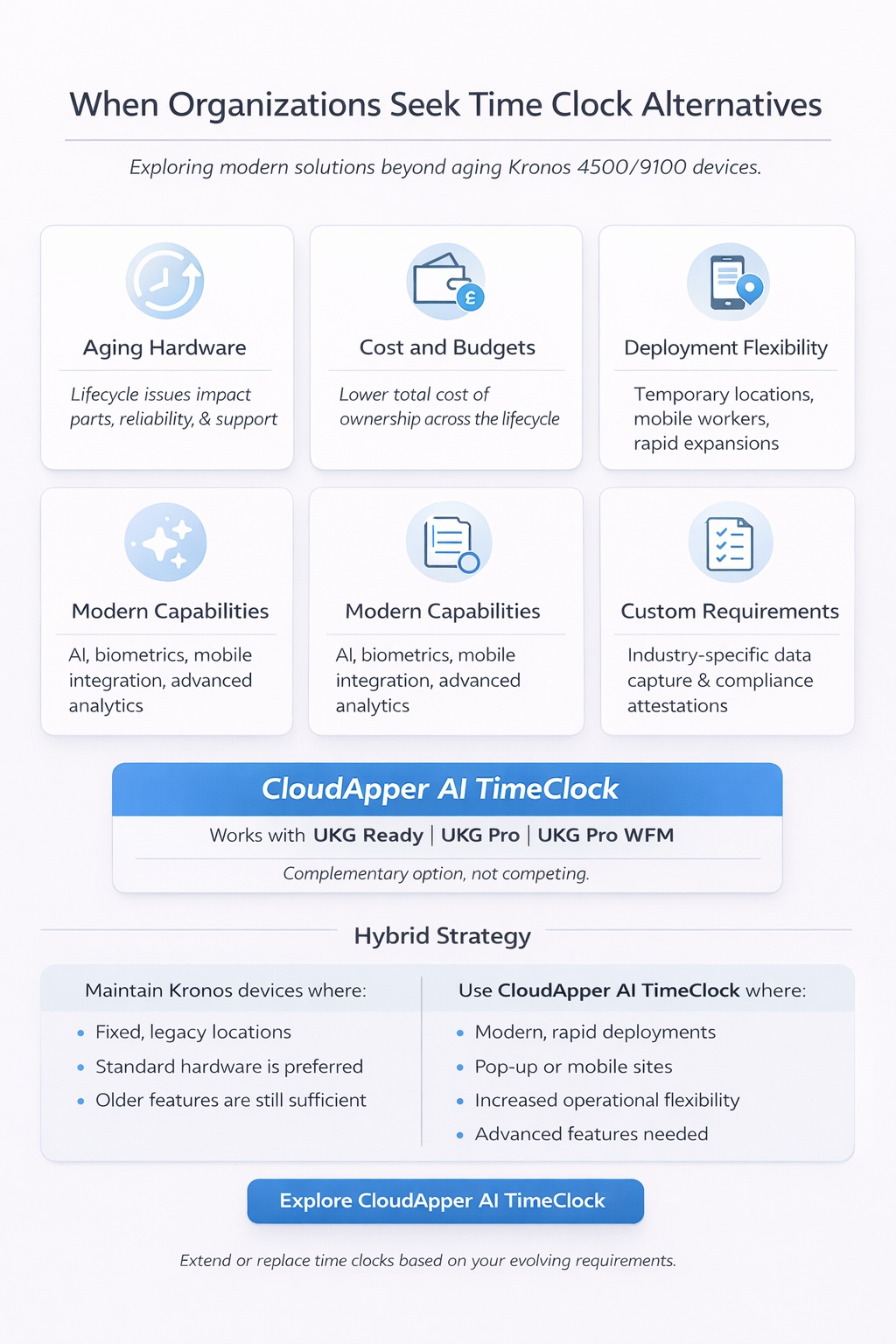
Organizations with Kronos 4500 or 9100 time clocks often find themselves evaluating alternative solutions for various practical, strategic, and operational reasons. Understanding these scenarios helps HR leaders make informed decisions about their time clock strategy.
Hardware Lifecycle and Aging Infrastructure
Technology infrastructure doesn’t last forever. Organizations operating Kronos 4500 or 9100 devices face natural lifecycle considerations:
Aging Hardware: Many Kronos 4500 and 9100 devices have been in service for 10-15 years or longer. As hardware ages, failure rates increase, maintenance becomes more challenging, and reliability concerns grow.
Parts Availability: Older hardware eventually faces parts availability challenges. When devices fail, finding replacement components or repair services becomes increasingly difficult and expensive.
Technology Obsolescence: Even functioning older hardware lacks modern capabilities that newer solutions provide. Touchscreen interfaces, advanced biometrics, mobile connectivity, and AI-powered features simply weren’t available when these devices were manufactured.
Support Considerations: As manufacturers focus on newer products, support for legacy hardware naturally diminishes. Organizations may find technical assistance, software updates, or troubleshooting resources increasingly limited.
When replacement becomes necessary due to failure or obsolescence, organizations face an important decision: replace aging devices with similar hardware or explore modern alternatives that might better serve current needs?
Cost Considerations and Budget Optimization
Financial factors often drive exploration of time clock alternatives:
Replacement Costs: When Kronos 4500 or 9100 devices fail or require replacement, acquiring new time clock hardware represents significant capital expenditure, particularly for organizations needing multiple devices across various locations.
Maintenance and Repair: Aging hardware often requires increasing maintenance investment. Repair costs for older devices can approach replacement costs, creating difficult financial decisions.
Expansion Requirements: Organizations growing or opening new locations need additional time clock capacity. The cumulative cost of deploying traditional time clock hardware at scale can strain budgets and delay deployments.
Total Cost of Ownership: Forward-thinking organizations evaluate total cost of ownership over time, including initial hardware costs, maintenance, support, and eventual replacement. Alternative approaches may offer more favorable long-term economics.
Budget-conscious organizations seek time clock solutions that provide required functionality at lower total cost, enabling broader deployment within existing budget constraints.
Operational Flexibility Requirements
Modern operational realities often demand more flexibility than traditional fixed hardware provides:
Temporary Locations: Seasonal operations, temporary facilities, pop-up locations, or project-based work require time clock capabilities for limited durations. Investing in permanent hardware for temporary needs creates unnecessary expense.
Rapid Deployment Needs: Organizations experiencing rapid growth, opening new locations quickly, or responding to urgent operational requirements need time clock capabilities deployed faster than traditional hardware procurement and installation allows.
Mobile Workforce: Field service technicians, home healthcare workers, traveling nurses, delivery drivers, and other mobile employees need time tracking capabilities but work outside fixed locations where traditional time clocks can be installed.
Diverse Location Types: Organizations with a mix of large facilities, small satellite offices, temporary sites, and mobile workers may benefit from different time clock approaches for different scenarios rather than one-size-fits-all hardware.
Business Continuity: Organizations need backup time clock capabilities that can be activated quickly if primary systems fail, ensuring business continuity without maintaining expensive redundant hardware.
Enhanced Functionality and Modern Capabilities
Technology has advanced dramatically since the Kronos 4500 and 9100 were designed. Organizations increasingly seek capabilities that older hardware cannot provide:
Artificial Intelligence: AI-powered features including conversational interfaces, intelligent facial recognition, predictive analytics, and automated decision support represent significant advances beyond what legacy hardware offers.
Mobile Integration: Employees expect to interact with workplace systems through smartphones. Modern time clock solutions integrate mobile capabilities that weren’t possible with standalone terminals designed decades ago.
Advanced Self-Service: Today’s employees expect comprehensive self-service capabilities—scheduling, time-off management, benefits access, HR information—integrated into their time clock experience.
Real-Time Analytics: Modern workforce management benefits from real-time visibility into attendance patterns, labor utilization, and predictive insights that help optimize operations proactively.
Enhanced User Experience: Consumer technology has raised expectations for intuitive interfaces, responsive design, and seamless interactions. Time clock solutions designed decades ago reflect older user experience paradigms.
Organizations pursuing innovation and seeking to provide employees with modern technology experiences often explore alternatives that deliver contemporary capabilities.
Customization and Industry-Specific Requirements
Organizations discover unique operational requirements that generic time clock hardware wasn’t designed to address:
Industry-Specific Data Capture: Healthcare organizations need patient care unit assignments, retail operations require department or commission tracking, manufacturing facilities need job costing data, and education institutions require program or activity assignments—all at the time clock.
Custom Workflows: Organizations with specialized processes need time clock solutions that can be configured to support unique workflows rather than forcing operations to conform to rigid hardware limitations.
Compliance and Attestations: Industry-specific compliance requirements may demand custom attestations, policy acknowledgments, safety confirmations, or regulatory declarations that standard time clock hardware cannot easily accommodate.
Integration Requirements: Organizations may need time clock functionality to integrate with systems beyond UKG, such as access control, building management, industry-specific applications, or other operational systems.
Multi-Language Support: Organizations with diverse workforces need extensive multi-language capabilities customized to their specific employee demographics beyond what fixed hardware provides.
When standard hardware cannot be configured to match operational realities, organizations seek alternatives that offer greater flexibility.
CloudApper AI TimeClock: A Modern Alternative
The CloudApper AI TimeClock represents a contemporary approach to time and attendance that addresses many scenarios where organizations seek alternatives to traditional time clock hardware. Rather than positioning this solution as replacing the Kronos 4500 or 9100, CloudApper AI TimeClock serves as a complementary option that organizations can deploy based on their specific operational requirements, budget constraints, and strategic priorities.
Many organizations successfully implement hybrid strategies, maintaining their existing Kronos hardware where it continues serving well while leveraging CloudApper AI TimeClock for new locations, temporary deployments, mobile workers, or scenarios where modern capabilities provide distinct advantages.
The Software-Based Approach to Time Clocking
CloudApper AI TimeClock fundamentally reimagines time clock deployment by transforming commercial tablets or existing devices into fully-functional UKG time clocks through software. This approach eliminates dependence on specialized hardware while maintaining all essential time and attendance capabilities and seamless UKG integration.
The solution connects directly to UKG Ready, Pro, and Pro WFM systems through standard APIs, ensuring real-time data synchronization and maintaining data integrity. From UKG’s perspective, CloudApper AI TimeClock functions identically to any other time capture method, preserving existing workflows, business rules, and reporting.
This software-based architecture provides organizations with deployment flexibility, cost advantages, and capability enhancements that traditional fixed hardware cannot match while maintaining the reliable UKG integration essential for accurate workforce management.
CloudApper AI TimeClock as an Affordable Alternative
For organizations facing replacement or expansion of time clock infrastructure, CloudApper AI TimeClock delivers substantial cost advantages while maintaining or enhancing functionality.
Dramatic Hardware Cost Reduction
The most immediate financial benefit comes from eliminating expensive specialized time clock hardware. CloudApper AI TimeClock runs on commercial Android tablets or iPads that cost a fraction of traditional time clock terminals:
Commercial Tablet Pricing: Quality tablets suitable for time clock deployment typically cost $200-400, compared to significantly higher costs for specialized time clock hardware.
Scale Economics: For organizations needing time clocks across dozens or hundreds of locations, this cost differential creates substantial savings. A healthcare system deploying 50 time clock locations might reduce capital expenditure by tens of thousands of dollars compared to traditional hardware.
No Proprietary Hardware Dependence: Organizations aren’t locked into proprietary hardware ecosystems. Standard commercial tablets are widely available, prices continue declining as technology advances, and organizations benefit from ongoing innovation in consumer tablet markets.
Replacement and Refresh Advantages
When time clock hardware fails or becomes obsolete, replacement economics favor the software-based approach:
Lower Replacement Costs: When a tablet fails, replacement costs remain minimal. Organizations can often replace devices same-day from local retailers rather than waiting for specialized hardware procurement.
Technology Refresh: As tablet technology advances, organizations can upgrade to newer, more capable devices at modest cost, continually improving time clock capabilities without software replacement.
Reduced Inventory Requirements: Organizations need minimal spare device inventory since replacements are readily available commercially, reducing capital tied up in backup hardware.
Extended Lifecycle Value: Software updates deliver new features and capabilities to existing devices, extending useful life and delaying replacement needs.
Maintenance and Support Cost Advantages
Ongoing operational costs favor CloudApper AI TimeClock:
Standard Device Support: IT teams already possess expertise supporting tablets and mobile devices. No specialized training for proprietary time clock hardware is required.
Local Repair Options: Tablets can often be serviced locally rather than requiring manufacturer-specific service channels.
Reduced Downtime: Quick replacement from commercial sources minimizes downtime compared to waiting for specialized hardware repair or replacement.
Software-Based Troubleshooting: Many issues can be resolved through software updates or configuration changes without hardware intervention.
Budget Optimization Strategies
The cost advantages enable several strategic approaches:
Broader Coverage: Organizations can provide time clock access to more employees and locations than would be feasible with expensive hardware, improving employee experience while reducing administrative burden.
Phased Deployment: Lower per-device costs support incremental rollouts where organizations can deploy time clocks as budget allows rather than requiring large capital commitments.
Mixed Strategy: Organizations can strategically deploy premium hardware where maximum value is delivered while using cost-effective alternatives in other scenarios, optimizing total spend.
Pilot Programs: Organizations can test new approaches in select locations with minimal financial risk before broader deployment.
For organizations replacing aging Kronos 4500 or 9100 devices or expanding time clock coverage, CloudApper AI TimeClock‘s cost advantages enable achievement of workforce management goals within budget constraints.
AI-Powered Functionality: Next-Generation Time Tracking
CloudApper AI TimeClock incorporates artificial intelligence capabilities that represent significant advances beyond what legacy time clock hardware could provide, delivering modern functionality that enhances both employee experience and operational effectiveness.
Conversational AI Interface
One of the most transformative features is the conversational AI interface that allows employees to interact naturally with the time clock:
Natural Language Interaction: Rather than navigating menus or pressing specific button sequences, employees can simply speak or type requests in natural language:
- “Clock me in”
- “What time is my shift tomorrow?”
- “How many vacation days do I have left?”
- “I need to request Friday off”
- “Can I swap my Wednesday shift?”
Intuitive Experience: The conversational approach eliminates training requirements and makes time clock interactions intuitive even for employees uncomfortable with technology.
Rapid Transactions: Natural language interaction often completes transactions faster than navigating traditional menu systems, particularly valuable during shift changes when many employees need time clock access simultaneously.
Multilingual Support: The AI understands and responds in multiple languages, automatically detecting employee language preferences and communicating accordingly.
This represents a fundamental advancement beyond the keypad interfaces of the Kronos 4500 or even the touchscreen menus of the 9100, creating genuinely intuitive time clock interactions.
Advanced AI-Powered Facial Recognition
While the Kronos 9100 offered fingerprint biometrics, CloudApper AI TimeClock leverages advanced AI-powered facial recognition that provides superior capabilities:
High Accuracy Recognition: Deep learning algorithms achieve exceptional recognition accuracy across diverse employee populations, lighting conditions, and over time as employee appearance changes.
Fast Processing: Recognition occurs in under a second, even in high-traffic scenarios where numerous employees clock in simultaneously during shift changes.
Anti-Spoofing Protection: Advanced AI detects spoofing attempts using photos or videos, maintaining security against circumvention.
Continuous Learning: The facial recognition system improves over time through machine learning, adapting to gradual changes in employee appearance without requiring re-enrollment.
Privacy Protection: Facial data is processed securely with appropriate protections for biometric information and compliance with regulations like BIPA in Illinois and similar state laws.
Mask Detection: Post-pandemic capabilities include detection of whether employees are wearing required masks, supporting health and safety protocols.
Intelligent Attendance Monitoring
AI capabilities enable proactive workforce management features beyond simple time capture:
Anomaly Detection: The system identifies unusual patterns that might indicate errors, time theft, or compliance issues—such as employees consistently clocking in significantly early or patterns suggesting buddy punching—and alerts supervisors to investigate.
Predictive Analytics: AI analyzes historical attendance patterns to predict future absences, enabling proactive scheduling adjustments and identifying potential attendance issues before they become problems.
Smart Reminders: Employees receive intelligent reminders about upcoming shifts, required attestations, or pending requests based on learned patterns and individual circumstances.
Compliance Monitoring: The system monitors for potential compliance issues such as missed meal breaks, excessive hours, or minor labor law violations, enabling proactive intervention.
HR Query Resolution Through AI
The conversational interface serves as an intelligent HR assistant:
Policy Information: Employees can ask questions about HR policies, benefits, procedures, or organizational information and receive accurate, instant responses.
Process Guidance: Receive step-by-step guidance for HR processes without requiring HR staff assistance.
Personalized Responses: AI tailors responses based on employee role, location, and circumstances, providing relevant information specific to each individual’s situation.
Learning System: The AI continuously improves from interactions, becoming more helpful and accurate over time.
These AI-powered capabilities represent substantial advancement beyond what the Kronos 4500 or 9100 could provide, delivering modern functionality that improves both employee experience and organizational efficiency.
Portability and Deployment Flexibility
CloudApper AI TimeClock‘s software-based architecture provides deployment flexibility that addresses numerous scenarios where traditional fixed hardware presents limitations.
Rapid Deployment Capabilities
Organizations can deploy CloudApper AI TimeClock in hours rather than the extended timelines typical for traditional time clock installation:
Fast Configuration: Setting up a new time clock location simply involves configuring a tablet with the CloudApper application and connecting to your UKG environment. No specialized installation, wiring, or hardware configuration is required.
Immediate Availability: Organizations can have time clock capabilities operational immediately when needed rather than waiting for hardware procurement, shipping, and professional installation.
Emergency Response: When unexpected situations require additional time clock capacity—such as disaster response, emergency operations, or urgent business needs—CloudApper AI TimeClock can be deployed instantly.
This rapid deployment capability contrasts sharply with traditional time clock hardware that requires procurement processes, professional installation, and network configuration before becoming operational.
Temporary and Seasonal Deployments
Organizations with temporary workforce management needs benefit tremendously from CloudApper AI TimeClock‘s portability:
Seasonal Operations: Retail holiday seasons, agricultural harvests, tax preparation periods, or other seasonal peaks often require temporary time clock capacity that can be deployed and removed as needed without permanent hardware investment.
Project-Based Work: Construction sites, temporary facilities, consulting projects, or time-limited operations need time clock capabilities for defined periods. Traditional hardware creates stranded investment when projects conclude.
Event Staffing: Organizations managing conferences, sporting events, festivals, or temporary operations can deploy time clock capabilities for event duration without long-term commitments.
Pop-Up Locations: Retail pop-ups, temporary clinics, mobile services, or short-term facilities can have full time clock functionality without the cost and complexity of permanent installations.
Testing and Pilots: Organizations can pilot new locations, test operational concepts, or validate business models with full time clock capabilities before committing to permanent infrastructure.
For organizations that maintained Kronos 4500 or 9100 devices in storage for temporary deployments or backup purposes, CloudApper AI TimeClock provides similar flexibility without requiring spare hardware investment.
Mobile and Remote Worker Support
CloudApper AI TimeClock extends time tracking to employees working outside traditional facilities:
Field Service Technicians: Workers traveling to customer locations can clock in and out from their work sites using smartphones, capturing accurate time and location data.
Home Healthcare Workers: Nurses, caregivers, and therapists visiting patients can clock in at the point of care, documenting service times and locations for billing and compliance.
Delivery and Transportation: Drivers can track work hours accurately from their routes without returning to facilities for time clock access.
Remote Employees: Workers operating from home offices or remote locations maintain consistent time tracking using the same interface as on-site employees.
Traveling Staff: Sales representatives, consultants, or other traveling employees can maintain accurate time records regardless of location.
This mobile capability simply wasn’t possible with fixed hardware like the Kronos 4500 or 9100, representing fundamental expansion of time clock accessibility.
Multi-Site Deployment Advantages
Organizations operating across numerous locations benefit from CloudApper AI TimeClock‘s deployment model:
Consistent Experience: All locations can provide identical time clock functionality regardless of facility size, ensuring consistent employee experience across the organization.
Rapid Expansion: New locations can have time clock capabilities operational immediately upon opening without waiting for hardware procurement and installation.
Centralized Management: IT and HR teams manage all time clock deployments from a central console regardless of geographic distribution, simplifying administration.
Location-Specific Configuration: While maintaining consistency, each location can implement customizations relevant to local requirements, regulations, or workflows.
Scalable Architecture: Organizations can add or remove time clock locations freely without significant capital investment or procurement delays.
For organizations that standardized on Kronos 4500 or 9100 across multiple locations, CloudApper AI TimeClock provides similar consistency with greater deployment flexibility and lower total cost.
Customization: Tailoring Time Clocks to Your Operations
CloudApper AI TimeClock’s software architecture enables extensive customization that allows organizations to configure time clock functionality to match specific operational requirements—capabilities that fixed hardware like the Kronos 4500 or 9100 cannot easily accommodate.
Industry-Specific Data Capture
Different industries require different information at the time clock. CloudApper AI TimeClock can be configured to capture industry-specific data:
Healthcare Applications:
- Patient care units, departments, or cost centers
- Certifications or specialties for skill-based scheduling
- Care activities or patient identifiers for billing integration
- Equipment assignments or supply usage tracking
- COVID screening responses or health attestations
Retail Environments:
- Register assignments, departments, or sales areas
- Commission-eligible activities or sales associates
- Tip amounts for hospitality operations
- Merchandise handling or cash drawer accountability
- Opening and closing checklist confirmations
Manufacturing Operations:
- Job numbers, work orders, or production batches
- Machine assignments or quality checkpoints
- Safety equipment confirmations or tooling assignments
- Production counts or quality metrics
- Maintenance activities or equipment status
Education Institutions:
- School buildings, programs, or special events
- Substitute assignments or extracurricular supervision
- Transportation duties or special assignments
- Student supervision ratios or activity participation
This customizable data capture ensures time clock interactions support broader operational and financial management requirements beyond basic time tracking—functionality that required expensive custom development for older hardware platforms.
Custom Attestations and Confirmations
Organizations can configure custom attestations that employees must acknowledge during clock-in or clock-out:
Safety and Compliance:
- Safety protocol reviews and equipment inspections
- Personal protective equipment (PPE) confirmations
- Hazard awareness and incident reporting
- Equipment status verification
- Vehicle inspection completions
Policy and Training:
- Policy update acknowledgments
- Training completion confirmations
- Procedure change notifications
- Regulatory requirement attestations
- Code of conduct affirmations
Health and Wellness:
- Health screening questionnaires
- Symptom attestations
- Fitness for duty confirmations
- Exposure declarations
- Wellness program participation
Operational Procedures:
- Shift handoff completions
- Inventory verifications
- Cash handling procedures
- Security checkpoint confirmations
- Quality audit completions
These customizable attestations ensure critical confirmations occur at the point of time capture, creating documented records integrated directly into your UKG system—far beyond what the Kronos 4500 or 9100 could accommodate without custom development.
Workflow Customization
CloudApper AI TimeClock supports configuration of custom workflows that match your operational processes:
Multi-Step Punch Processes: Configure time clocks to require multiple steps such as department selection, task assignment, equipment checkout, or supervisor verification before punches are finalized.
Conditional Logic: Implement workflows where time clock behavior changes based on employee role, location, shift time, day of week, or other variables.
Approval Routing: Configure custom approval workflows for exception requests, schedule changes, or time-off requests initiated at the time clock.
Integration Points: Connect time clock interactions with other systems such as access control, building management, inventory systems, or industry-specific applications.
Role-Based Experiences: Different employee types can have completely different time clock experiences optimized for their specific needs and authorized functions.
User Interface Customization
The time clock interface itself can be customized to match organizational preferences:
Branding and Identity: Apply organizational logos, colors, and branding to create a consistent visual experience that reflects your workplace culture.
Language Configuration: Implement multi-language support with specific languages relevant to your workforce demographics, with automatic language detection based on employee profiles.
Button Layout and Navigation: Customize button arrangements, labels, menu structures, and workflows to match how your employees think about time clock interactions.
Information Display: Configure what information employees see during clock-in—upcoming shifts, accrual balances, organizational announcements, safety reminders, or performance metrics.
Accessibility Options: Adjust text size, contrast, audio feedback, or other accessibility features to ensure all employees can use time clocks effectively.
Custom Reporting and Analytics
CloudApper AI TimeClock can be configured to generate custom reports and analytics specific to organizational needs:
Department-Specific Metrics: Track and report time and attendance data organized by your specific operational structure.
Compliance Reporting: Generate reports formatted to meet regulatory requirements, audit standards, or industry-specific compliance needs.
Operational Analytics: Create dashboards providing insights into labor utilization, schedule adherence, productivity metrics, or workforce efficiency.
Exception Management: Configure custom exception reports identifying situations requiring management attention based on your specific business rules.
Trend Analysis: Develop custom analytics identifying attendance patterns, seasonal variations, or predictive indicators relevant to your operations.
This extensive customization capability represents substantial advancement beyond the limited configurability of the Kronos 4500 or 9100, enabling time clocks that truly match how your organization operates.
Self-Service and HR Service Delivery Kiosk Functionality
CloudApper AI TimeClock extends far beyond basic time punches to serve as a comprehensive employee self-service and HR service delivery platform—capabilities that dramatically exceed what the Kronos 4500 or 9100 provided.
Comprehensive Employee Self-Service
Employees can perform numerous HR and workforce management tasks directly at the time clock:
Schedule Management:
- View upcoming shifts across multiple weeks
- Request shift trades with qualified colleagues
- Bid on available open shifts
- Confirm scheduled shifts
- View shift differential or premium pay eligibility
- Access department or team schedules
Time-Off Management:
- Submit time-off requests with reason codes
- View accrual balances across multiple categories
- Check pending request status
- Review time-off history
- Access organizational blackout periods or restrictions
- View team member time-off schedules
Timecard Operations:
- Review punches and hours worked
- Identify exceptions requiring attention
- Submit punch corrections with explanations
- View overtime hours and projections
- Access historical timecard data
- Download or email timecard summaries
Personal Information:
- Update contact information
- Modify emergency contacts
- Update direct deposit information
- Change communication preferences
- Access tax withholding forms
- Review benefit enrollment status
Document Access:
- View pay stubs and earnings statements
- Access tax documents (W-2s, etc.)
- Review benefit summaries
- Access company policies and handbooks
- View training materials or certifications
- Download employment verification letters
Benefits Information:
- Review current benefit elections
- Access benefit provider contact information
- View dependent coverage
- Check benefit eligibility
- Access wellness program information
- Review retirement account balances
HR Query Resolution Through Conversational AI
The AI-powered interface transforms the time clock into an HR information desk:
Policy Questions: Employees ask questions about HR policies, procedures, or benefits and receive accurate, instant responses without waiting for HR availability.
Procedural Guidance: Receive step-by-step guidance for HR processes such as filing claims, updating information, or accessing services.
Status Inquiries: Check status of pending requests, applications, or processes without contacting HR.
FAQ Access: Access answers to frequently asked questions about compensation, benefits, workplace policies, or organizational information.
Benefit Calculations: Get estimates of vacation accrual, retirement contributions, or benefit values based on personal circumstances.
Resource Identification: Find appropriate contacts, forms, or resources for specific needs or situations.
This self-service capability dramatically reduces routine inquiries to HR staff, allowing HR teams to focus on strategic initiatives rather than answering repetitive questions—a quantum leap beyond the limited self-service the Kronos 9100 provided.
Manager Self-Service Capabilities
CloudApper AI TimeClock provides manager-specific functionality:
Approval Workflows:
- Approve time-off requests from team members
- Review and approve timecard exceptions
- Authorize schedule changes or shift swaps
- Approve overtime or premium pay
- Review and approve punch corrections
Team Visibility:
- View team schedules and coverage
- Monitor attendance patterns and exceptions
- Track time-off requests and balances
- Review labor utilization and costs
- Access team performance metrics
Schedule Management:
- Make schedule adjustments
- Assign shifts to team members
- Fill open shifts from available employees
- Manage shift bids or trades
- Adjust coverage for absences
Communication Tools:
- Send messages to team members
- Post announcements or updates
- Acknowledge employee communications
- Distribute policy changes
- Share performance feedback
Organizational Communication Hub
The time clock serves as a communication channel:
Targeted Messaging: Display announcements to specific employees, departments, or locations based on relevance.
Policy Distribution: Communicate policy updates, procedural changes, or important information when employees clock in.
Emergency Communications: Rapidly communicate urgent information to employees across your organization.
Training Reminders: Notify employees of required training, certification renewals, or compliance requirements.
Recognition Programs: Display achievement recognition, milestone celebrations, or performance acknowledgments.
Safety Alerts: Communicate safety incidents, hazard notifications, or protective action requirements.
Benefits of Enhanced Self-Service
Transforming time clocks into comprehensive self-service kiosks delivers substantial organizational benefits:
Reduced HR Workload: Routine inquiries and transactions handled through self-service dramatically reduce demands on HR staff, allowing focus on strategic priorities rather than administrative tasks.
Improved Employee Experience: Employees appreciate immediate access to information and services without waiting for HR availability, scheduling appointments, or making phone calls.
Increased Accuracy: Self-service reduces data entry errors since employees directly control their information.
24/7 Availability: Employees can access HR services during their scheduled shifts regardless of HR office hours—particularly valuable for organizations with 24/7 operations or shift workers.
Cost Efficiency: Expanding HR services without proportionally expanding HR headcount improves organizational efficiency and cost management.
Better Engagement: Empowering employees with self-service tools improves engagement and satisfaction with HR services.
For organizations accustomed to the Kronos 4500’s basic punch functionality or even the 9100’s limited self-service, CloudApper AI TimeClock‘s comprehensive kiosk capabilities represent transformative advancement in employee experience and HR efficiency.
Seamless Integration with UKG Systems
Regardless of advanced features, time clock solutions must integrate seamlessly with UKG Ready, Pro, or Pro WFM to maintain workforce management integrity. CloudApper AI TimeClock is purpose-built for UKG integration.
Real-Time Data Synchronization
CloudApper AI TimeClock maintains continuous connectivity with your UKG system:
Immediate Punch Recording: Clock punches transmit to UKG instantly, ensuring managers have real-time visibility into employee attendance.
Schedule Synchronization: Changes to schedules in UKG immediately reflect at the time clock, ensuring employees always see current information.
Employee Data Updates: Changes to employee information, roles, assignments, or permissions in UKG automatically update time clock configurations.
Accrual Information: Time-off balances and accrual information displayed at the time clock reflect real-time UKG data.
Business Rule Application: The system applies UKG-configured business rules in real-time, ensuring compliance with organizational policies.
UKG Business Rule Compliance
CloudApper AI TimeClock respects and enforces UKG business rules:
Overtime Calculations: The system applies UKG-configured overtime rules when validating punches and notifying employees of overtime situations.
Break Requirements: Enforces configured meal and rest break requirements, preventing early punches or ensuring required breaks are documented.
Schedule Adherence: Validates punches against scheduled shifts, alerting employees to early arrivals, late starts, or unexpected punches.
Authorization Rules: Respects UKG permissions and authorization rules, ensuring employees can only perform actions they’re authorized for.
Pay Code Application: Correctly applies pay codes, shift differentials, and premium pay based on UKG configuration.
Workflow Integration
CloudApper AI TimeClock integrates with UKG workflows:
Approval Processes: Time-off requests, schedule changes, or exception corrections initiated at the time clock flow through configured UKG approval workflows.
Notification Systems: UKG notifications reach employees through the time clock interface, maintaining communication consistency.
Attestation Recording: Attestations captured at the time clock are documented in UKG, maintaining comprehensive audit trails.
Exception Management: Exceptions identified at the time clock integrate with UKG exception management processes.
Reporting Consistency
Data captured through CloudApper AI TimeClock appears in UKG reports identically to data captured through other methods, ensuring reporting consistency and eliminating parallel reporting requirements. Organizations maintaining some Kronos 4500 or 9100 devices while deploying CloudApper AI TimeClock will see consistent data from all sources in UKG reporting.
Implementation and Migration
Organizations transitioning from Kronos 4500/9100 devices or implementing CloudApper AI TimeClock benefit from straightforward deployment processes.
Migration from Kronos 4500/9100
Organizations replacing Kronos hardware can migrate smoothly:
Parallel Operation: CloudApper AI TimeClock can operate alongside existing Kronos 4500 or 9100 devices during transition periods. Both solutions integrate with UKG identically, allowing gradual migration without disruption.
Location-by-Location Migration: Organizations can replace devices incrementally, migrating one location at a time to minimize risk and allow employees to adapt gradually.
Employee Transition: Since both solutions connect to the same UKG system, employee data, schedules, and history remain continuous throughout migration.
Badge Compatibility: Organizations using proximity badges with Kronos devices can continue using the same badges with CloudApper AI TimeClock equipped with badge readers.
Biometric Migration: Employees accustomed to fingerprint authentication on Kronos 9100 devices can transition to facial recognition or continue using alternative authentication methods during adaptation.
Implementation Timeline
Organizations can deploy CloudApper AI TimeClock rapidly:
Planning Phase (1-2 weeks): Identify deployment locations, determine requirements, specify customizations, and plan employee communication.
Configuration (1-2 weeks): CloudApper configures the solution to match your UKG environment, organizational requirements, and desired customizations.
Testing (1 week): Validate functionality in test environments, ensuring seamless UKG integration and proper configuration.
Deployment (1-2 weeks): Roll out CloudApper AI TimeClock to selected locations with employee orientation and manager training.
Optimization (Ongoing): Monitor usage, gather feedback, and refine configuration to optimize employee experience.
Most organizations complete implementation within 4-6 weeks from project initiation to production deployment, with simple configurations going live even faster.
Training Requirements
CloudApper AI TimeClock‘s intuitive interface minimizes training needs:
Employee Training: Most employees can use the conversational interface after brief orientation. The AI-powered system guides employees through interactions, making exploration and learning natural.
Manager Training: Managers receive training on approval workflows, reporting capabilities, and management features relevant to their responsibilities.
Administrator Training: HR and IT administrators receive comprehensive training on configuration, customization, and management capabilities.
Transition Support: CloudApper provides extra support during transition from Kronos devices to ensure smooth employee adaptation.
Support and Maintenance
CloudApper provides comprehensive support:
Technical Support: Access to technical support for troubleshooting, configuration assistance, and issue resolution.
Training Resources: Documentation, video tutorials, and training materials to support ongoing user education.
Software Updates: Regular updates deliver new features, security patches, and performance improvements without requiring hardware upgrades.
Proactive Monitoring: CloudApper monitors system health and proactively addresses potential issues before they impact operations.
Security and Compliance
CloudApper AI TimeClock incorporates enterprise-grade security essential for workforce management.
Data Security
Encryption: All data transmission between time clocks and UKG systems uses encryption protocols, protecting employee information in transit and at rest.
Secure Authentication: Multiple authentication methods including facial recognition, PINs, and badge readers prevent unauthorized access.
Access Controls: Granular permissions ensure employees can only access appropriate functionality and information based on their roles.
Audit Trails: Comprehensive logging documents all time clock interactions, supporting compliance and investigation needs.
Device Security: Tablets can be configured in kiosk mode, preventing unauthorized access to other applications or device functions.
Compliance Support
Labor Law Compliance: Configurable to support federal and state labor laws including break requirements, overtime rules, and minor work restrictions.
Industry Regulations: Customizable to address industry-specific regulations such as HIPAA for healthcare, FLSA compliance, or food safety requirements.
Biometric Privacy: Compliant with state biometric privacy laws including Illinois BIPA, Texas CUBI, and similar regulations.
Audit Documentation: Maintains detailed records of attestations, policy acknowledgments, and compliance confirmations.
Data Retention: Configurable data retention policies ensure compliance with organizational and regulatory requirements.
Privacy Protection
Minimal Data Collection: Captures only data necessary for time tracking and configured organizational requirements.
Biometric Protection: Facial recognition data is processed securely with appropriate protections and can be disabled if organizational preferences require alternative authentication.
Employee Transparency: Clear communication about what data is collected and how it’s used maintains employee trust.
Cost Considerations and Value Proposition
Understanding the financial implications helps organizations make informed decisions about replacing or supplementing Kronos 4500/9100 devices.
Pricing Model
CloudApper typically uses subscription pricing based on number of employees and deployed time clock locations. This predictable pricing makes budgeting straightforward and avoids large capital expenditures that characterized traditional time clock hardware procurement.
Pricing generally includes:
- Software licensing for time clock functionality
- UKG integration and connectivity
- Standard customization and configuration
- Regular updates and enhancements
- Technical support and assistance
Organizations purchase tablets separately, providing flexibility to choose devices that match budget and requirements.
Total Cost Comparison
When comparing CloudApper AI TimeClock to replacing Kronos 4500 or 9100 devices with new hardware:
Lower Initial Investment: Substantial reduction in upfront capital expenditure enables broader deployment within existing budgets.
Reduced Replacement Costs: When devices fail, replacement costs remain minimal compared to specialized time clock hardware.
Lower Maintenance: Standard devices and software-based troubleshooting reduce ongoing maintenance costs.
Scalability Economics: Easy addition of time clock locations without significant capital investment supports business growth.
Future-Proof Investment: Software updates deliver new capabilities without hardware replacement, protecting investment value.
Return on Investment
Organizations realize ROI through multiple channels:
Hardware Savings: Direct savings from avoiding expensive time clock hardware purchases.
Administrative Efficiency: Self-service capabilities reduce HR workload and administrative time.
Improved Accuracy: Reduced payroll errors and time theft deliver direct cost savings.
Faster Deployment: Ability to deploy time clocks rapidly reduces opportunity costs and accelerates value realization.
Enhanced Capabilities: AI-powered features and advanced functionality provide operational advantages beyond basic time tracking.
Flexibility Value: Ability to deploy temporary time clocks, support mobile workers, and rapidly adapt to changing needs provides strategic value.
Most organizations achieve positive ROI within 6-12 months of deployment.
Frequently Asked Questions
Q: Can CloudApper AI TimeClock fully replace our Kronos 4500 or 9100 devices?
A: Yes, CloudApper AI TimeClock provides all essential time clock functionality that Kronos 4500 and 9100 devices provided, plus many advanced capabilities those devices cannot offer. Organizations successfully use CloudApper AI TimeClock as complete replacements for aging Kronos hardware. However, many organizations also choose hybrid approaches, maintaining some Kronos devices while using CloudApper AI TimeClock in other scenarios based on specific location needs.
Q: What happens to employee badge data when migrating from Kronos devices?
A: Employee badge numbers and credentials configured in UKG remain unchanged. If you equip CloudApper AI TimeClock tablets with compatible badge readers, employees can continue using the same proximity badges they used with Kronos devices. Alternatively, you can transition to other authentication methods such as facial recognition or PIN codes.
Q: Will our UKG reports look different with data from CloudApper AI TimeClock?
A: No. CloudApper AI TimeClock integrates with UKG through standard interfaces, and punch data appears in UKG reports identically to data from any other time capture method. Organizations maintaining both Kronos devices and CloudApper AI TimeClock will see consistent data from all sources in UKG reporting.
Q: How long do tablets typically last as time clocks?
A: Commercial tablets typically provide 3-5 years of reliable service in time clock applications. However, since replacement costs are modest, organizations can replace devices proactively before failures occur. The software-based approach means newer tablets provide better performance and capabilities, making periodic upgrades advantageous.
Q: Can CloudApper AI TimeClock work offline if network connectivity fails?
A: Yes, CloudApper AI TimeClock includes offline capabilities that allow employees to continue clocking in and out during network outages. Punches are stored locally and automatically synchronized with UKG once connectivity is restored, ensuring no time data is lost.
Q: What authentication methods does CloudApper AI TimeClock support?
A: CloudApper AI TimeClock supports multiple authentication methods including AI-powered facial recognition, PIN codes, QR codes, proximity badge readers, and barcode scanning. Organizations can configure which methods are available and can use different methods for different employee populations.
Q: How does the cost compare to buying new Kronos InTouch DX devices?
A: CloudApper AI TimeClock typically costs significantly less per location than purchasing new UKG time clock hardware, particularly when deploying across multiple locations. The combination of subscription pricing and commercial tablet costs generally provides 40-60% total cost savings compared to specialized time clock hardware.
Q: Can we pilot CloudApper AI TimeClock at a few locations before full deployment?
A: Absolutely. CloudApper AI TimeClock is ideal for pilot implementations. Organizations can deploy at one or several locations to validate functionality, gather employee feedback, and refine configuration before broader rollout. The low cost per location makes pilot programs financially practical.
Q: What happens if a tablet is damaged or stolen?
A: Tablets can be replaced quickly and inexpensively. Organizations can often replace damaged tablets same-day from local retailers. CloudApper AI TimeClock is configured centrally, so new tablets can be deployed rapidly by installing the application and connecting to your configuration. Lost or stolen tablets can be remotely disabled to prevent unauthorized access.
Q: Does CloudApper AI TimeClock require special IT infrastructure?
A: No special infrastructure is required. CloudApper AI TimeClock runs on standard tablets connected to your network via WiFi or cellular data. If you have network connectivity for employees to access other systems, you have adequate infrastructure for CloudApper AI TimeClock.
Q: Can CloudApper AI TimeClock capture the same data our Kronos devices captured?
A: Yes, and typically much more. CloudApper AI TimeClock can capture all standard time clock data that Kronos devices captured, plus additional custom data fields specific to your operational needs. The configurable architecture enables capture of industry-specific information that required expensive custom development for Kronos hardware.
Q: Will our employees who are used to Kronos devices adapt easily?
A: Most employees adapt quickly and actually prefer CloudApper AI TimeClock’s conversational interface. The natural language interaction is often more intuitive than navigating menu systems. CloudApper provides transition support and training resources to ensure smooth employee adaptation.
Conclusion: Modernizing Your Time Clock Infrastructure
The Kronos 4500 and 9100 time clocks served organizations well for many years, providing reliable time and attendance capabilities that became familiar fixtures in workplaces across industries. These devices represented quality engineering and thoughtful design for their era, and many continue operating effectively today.
However, technology evolution, changing employee expectations, budget realities, and operational requirements create scenarios where organizations benefit from exploring modern alternatives. Whether replacing aging devices reaching end-of-life, expanding time clock coverage to new locations, supporting mobile workers, or pursuing advanced capabilities that older hardware cannot provide, understanding all available options enables informed decision-making.
CloudApper AI TimeClock represents a contemporary approach to time and attendance that addresses the diverse scenarios where organizations seek alternatives to traditional time clock hardware:
For budget optimization, CloudApper AI TimeClock delivers essential functionality at dramatically lower cost than specialized time clock hardware, enabling broader deployment within budget constraints.
For deployment flexibility, the software-based approach supports rapid deployment, temporary installations, mobile workers, and diverse location types without hardware procurement delays.
For advanced capabilities, AI-powered features including conversational interfaces, intelligent facial recognition, and predictive analytics provide functionality that legacy hardware cannot match.
For customization needs, the configurable architecture enables industry-specific data capture, custom workflows, and specialized reporting that align precisely with operational requirements.
For enhanced employee experience, comprehensive self-service and HR kiosk functionality transform time clocks into valuable employee service platforms.
Many organizations successfully implement hybrid strategies, maintaining existing Kronos hardware where it continues serving well while leveraging CloudApper AI TimeClock for new deployments, temporary locations, mobile workers, or scenarios where modern capabilities provide distinct advantages. This flexibility allows optimization of total workforce management technology investment.
The decision to maintain, replace, or supplement Kronos 4500 or 9100 devices depends on your specific circumstances:
- Current device condition and remaining useful life
- Budget available for time clock infrastructure
- Deployment scenarios and location diversity
- Mobile workforce requirements
- Customization and advanced capability needs
- Employee experience priorities
- IT resources and support capabilities
- Timeline requirements for deployment
CloudApper AI TimeClock provides a modern, flexible, cost-effective alternative that maintains seamless UKG integration while delivering capabilities that extend far beyond what traditional time clock hardware provides. Whether deployed as complete replacement for aging Kronos devices or as complementary solution alongside existing hardware, CloudApper AI TimeClock ensures your organization has the time and attendance capabilities needed for operational excellence.
For HR leaders managing UKG Ready, Pro, or Pro WFM environments in healthcare, retail, manufacturing, and other industries, exploring CloudApper AI TimeClock offers an opportunity to modernize time clock infrastructure, reduce costs, increase flexibility, and enhance employee experience—all while maintaining the reliable UKG integration essential for accurate workforce management.
Learn more about how CloudApper AI TimeClock can modernize your time and attendance capabilities while respecting your investment in UKG workforce management systems.