Running payroll for a distributed team with weekly pay cycles in one country, bi-weekly in another, and monthly elsewhere is a significant challenge for many international companies. Each frequency brings its own cut-offs, approval windows, statutory deductions, tax rules, currency considerations, and reporting deadlines—creating a complex web that often results in manual errors, compliance risks, payroll disputes, and excessive operational burden on HR and payroll teams.
TL;DR
A large UKG construction customer eliminated attendance tracking “blind spots” by deploying CloudApper hrPad on mobile tablets for bus supervisors. This solution uses a custom Group Punch feature to check workers in/out during their commute from dormitories to job sites. By integrating directly with UKG, the company replaced manual paper manifests with real-time, verified attendance data, improving payroll accuracy and operational efficiency.
Common pain points include:
- Extra pay periods in bi-weekly cycles during certain years, complicating accruals and budgeting.
- Running multiple overlapping payroll batches, increasing the risk of discrepancies.
- Handling off-cycle adjustments or employee transitions between frequencies.
- Reconciling varying local labor laws, such as mandatory weekly pay requirements in some regions.
The key to making this manageable lies in accurate, flexible time tracking as the single source of truth. When hours, overtime, and deductions are captured correctly from the start and flow seamlessly into your payroll system, the downstream complexity drops dramatically—no matter how many frequencies you’re juggling.
A Practical Solution: Unified Time Tracking with CloudApper hrPad
CloudApper hrPad offers a straightforward, cost-effective way to centralize time capture for global, multi-frequency payroll without forcing a complete system overhaul.
hrPad turns your existing tablets (iPads or Android devices) into powerful AI-driven employee self-service kiosks. Frontline, remote, or distributed workers can clock in/out, manage requests, and access information—all while ensuring data accuracy and compliance across countries.
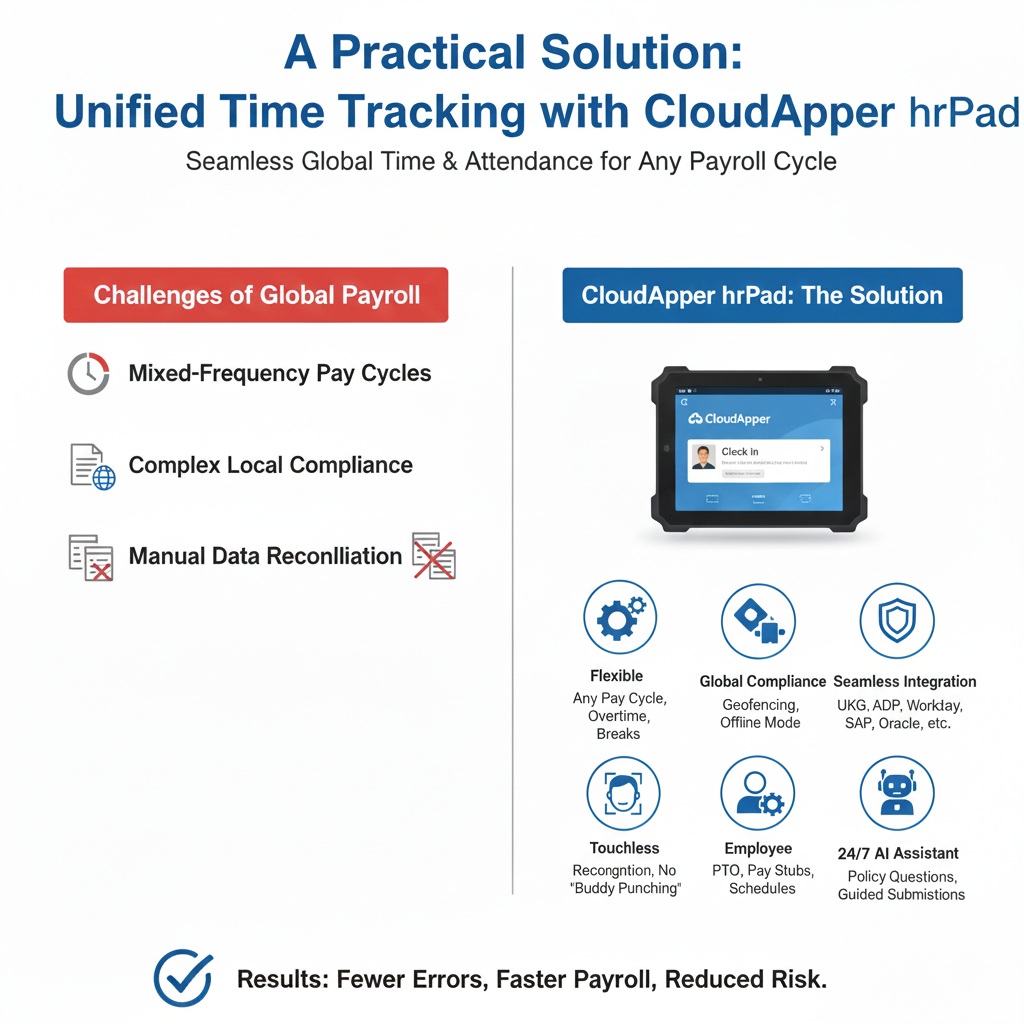
Here’s how it simplifies mixed-frequency payroll operations:
- Flexible Rules for Any Pay Cycle — Easily configure overtime, break policies, shift differentials, and custom calculations tailored to weekly, bi-weekly, or monthly requirements in each country.
- Country-Specific Compliance Built-In — Support for geofencing, offline clocking (critical for field or remote teams), and customizable attestations ensures adherence to local labor laws and statutory deductions.
- Seamless Integration with Leading HR/HCM/Payroll Systems — Real-time sync with platforms like UKG, ADP, Workday, SAP, Oracle, Paycom, Ceridian, Paylocity, Infor, Dayforce, and many others. Time data flows directly into your existing payroll runs, eliminating manual exports, imports, or spreadsheet reconciliation across cycles.
- Touchless, Secure Clock-Ins — Facial recognition prevents buddy punching and time theft, delivering clean, reliable data every time.
- Employee Self-Service Reduces Admin Load — Workers can view pay stubs, request PTO, check schedules, or submit availability themselves—cutting down on routine HR inquiries and last-minute approval chases during tight payroll windows.
- 24/7 AI Assistant — Built-in conversational AI answers policy questions, guides submissions, and ensures consistent rule application across countries—without adding strain to your team.
The result? Fewer errors, faster payroll processing, reduced compliance risk, and significantly less operational overhead—even with completely different pay frequencies running simultaneously.
FAQ: Workforce Tracking with CloudApper hrPad & UKG
1. What is the CloudApper Group Punch feature for UKG? It is a specialized solution that allows supervisors to clock in an entire crew or group of workers at once using a mobile tablet. Instead of each worker interacting with a stationary device, the supervisor manages the attendance manifest, which syncs directly with UKG Pro, Dimensions, or Ready.
2. How does hrPad handle attendance in areas with no internet? hrPad includes a robust Offline Mode. Supervisors can capture group punches and job transfers in remote locations or “dead zones.” Once the device regains a cellular or Wi-Fi signal, the data is automatically synchronized with the UKG system.
3. Does this solution help prevent “buddy punching” in the field? Yes. hrPad can be configured with AI-powered photo capture or biometric verification. When a supervisor performs a Group Punch, the system records a visual audit trail, ensuring that only the workers physically present are clocked into the system.
4. Can supervisors transfer crews between different projects throughout the day? Absolutely. hrPad allows for bulk job and cost center transfers. If a crew is moved from one construction site to another, the supervisor updates the project code for the entire group on their tablet, ensuring labor hours are billed correctly in UKG.
5. How does this replace traditional UKG hardware clocks? hrPad turns off-the-shelf iOS or Android tablets into powerful HR kiosks. This eliminates the need for expensive, stationary proprietary clocks, allowing for a 75% reduction in hardware costs while providing a mobile solution that moves with the workforce.
Because hrPad uses devices you already own, implementation is fast and affordable, making it ideal for growing global teams that need sanity without massive investment.
Ready to lighten the load on your multi-country payroll? Explore how CloudApper hrPad can streamline your time tracking and integrate seamlessly with your current systems.