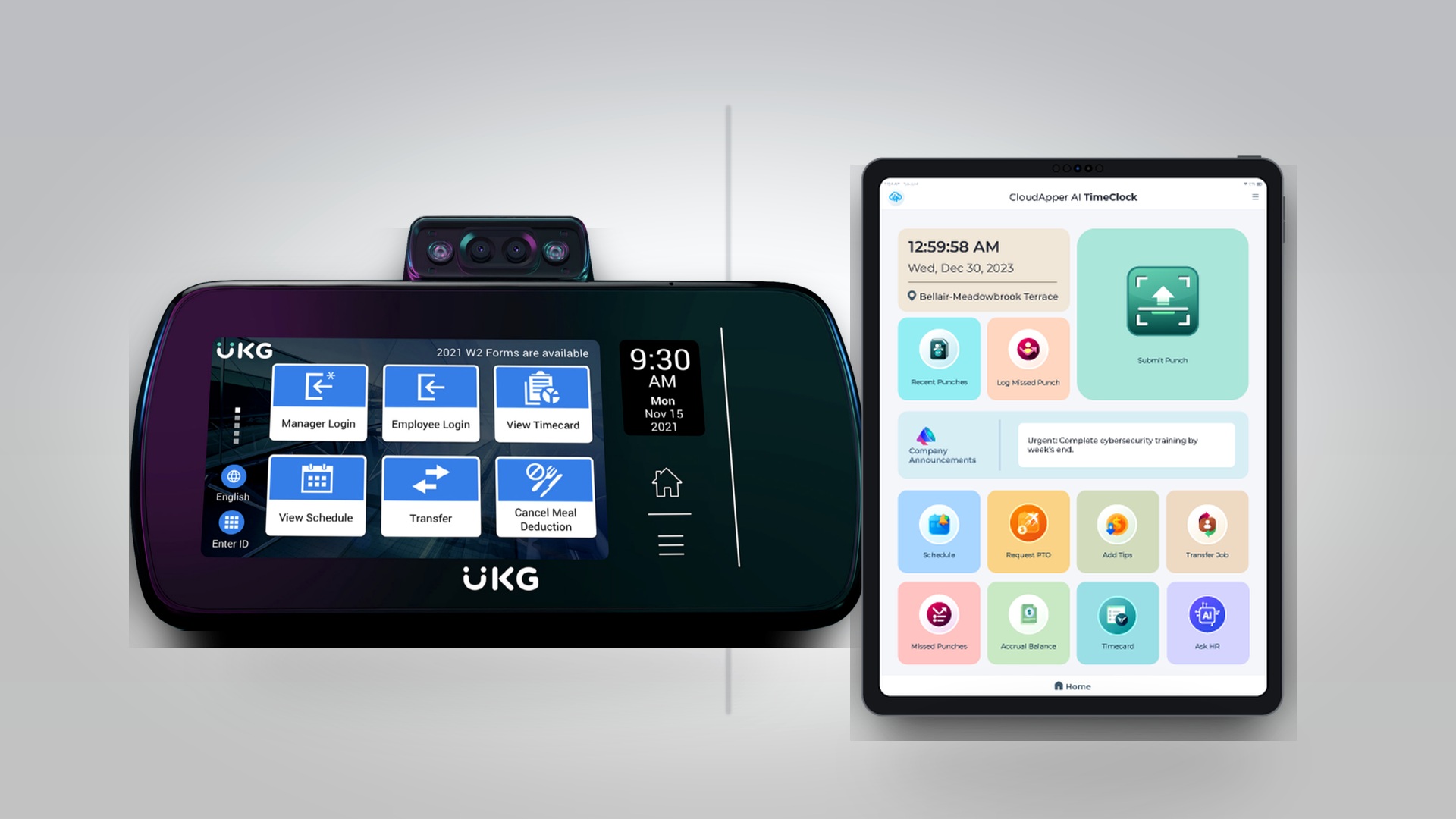
For organizations using UKG Ready, Pro, or Pro WFM, implementing reliable time and attendance hardware is essential for accurate workforce management. The UKG InTouch DX G2 represents UKG’s premium time clock solution, offering robust features designed to integrate seamlessly with your UKG environment. However, as HR leaders evaluate their time clock strategy across multiple locations and diverse workforce scenarios, understanding all available options becomes critical for making informed decisions that balance functionality, budget, and operational requirements.
This comprehensive guide explores the UKG InTouch DX G2 and examines situations where alternative solutions like CloudApper AI TimeClock might better serve specific organizational needs. Whether you’re managing a healthcare facility with hundreds of employees, coordinating retail locations across multiple states, or operating manufacturing plants with shift workers, the right time clock solution can significantly impact operational efficiency and employee satisfaction.
Understanding the UKG InTouch DX G2
The UKG InTouch DX G2 represents UKG’s advanced time clock technology, purpose-built to work seamlessly with UKG Ready, Pro, and Pro WFM systems. This hardware solution brings sophisticated time and attendance capabilities to the physical workplace, enabling employees to clock in and out, request time off, view schedules, and perform various self-service functions directly at a dedicated terminal.
Key Features of UKG InTouch DX G2
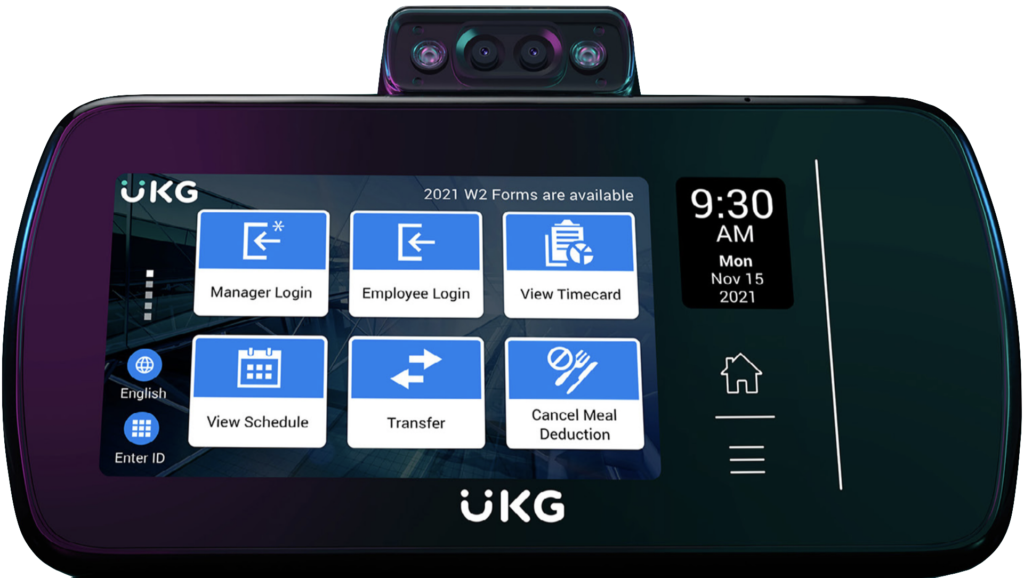
The InTouch DX G2 offers a comprehensive feature set designed for enterprise workforce management needs:
Biometric Authentication: The device supports multiple authentication methods including fingerprint scanning and facial recognition, helping prevent buddy punching and ensuring accurate time capture. This biometric capability is particularly valuable in environments where time theft and buddy punching present significant concerns.
Touchscreen Interface: A modern, intuitive touchscreen interface enables employees to navigate various functions easily, from basic clock punches to viewing schedules and requesting time off. The interface is designed to be user-friendly even for employees who may not be tech-savvy.
Badge Reader Integration: In addition to biometric options, the InTouch DX G2 supports badge readers, providing flexibility for organizations that prefer or require proximity card authentication.
Native UKG Integration: As a UKG product, the InTouch DX G2 integrates natively with UKG systems, ensuring real-time data synchronization and eliminating integration challenges that can arise with third-party solutions.
Employee Self-Service: Beyond time punches, the device enables employees to view their schedules, check accruals, request time off, and perform other self-service functions without requiring computer access.
Attestation Capabilities: The system can present policy acknowledgments, safety attestations, and other required confirmations during the clock-in process, supporting compliance requirements.
Rugged Construction: Designed for workplace environments, the InTouch DX G2 features durable construction suitable for various industrial, retail, and healthcare settings.
The Value of UKG’s Native Solution
Organizations choosing the UKG InTouch DX G2 benefit from UKG’s deep understanding of workforce management requirements and the assurance that comes with a purpose-built, vendor-supported solution. The native integration eliminates concerns about compatibility, ensures access to UKG support, and provides confidence that the hardware will evolve alongside the UKG software platform.
For many organizations, particularly large enterprises with standardized processes and substantial budgets for workforce management technology, the InTouch DX G2 represents an excellent choice that delivers comprehensive functionality with the backing of UKG’s enterprise support infrastructure.
When Organizations Seek UKG InTouch DX G2 Time Clock Alternatives
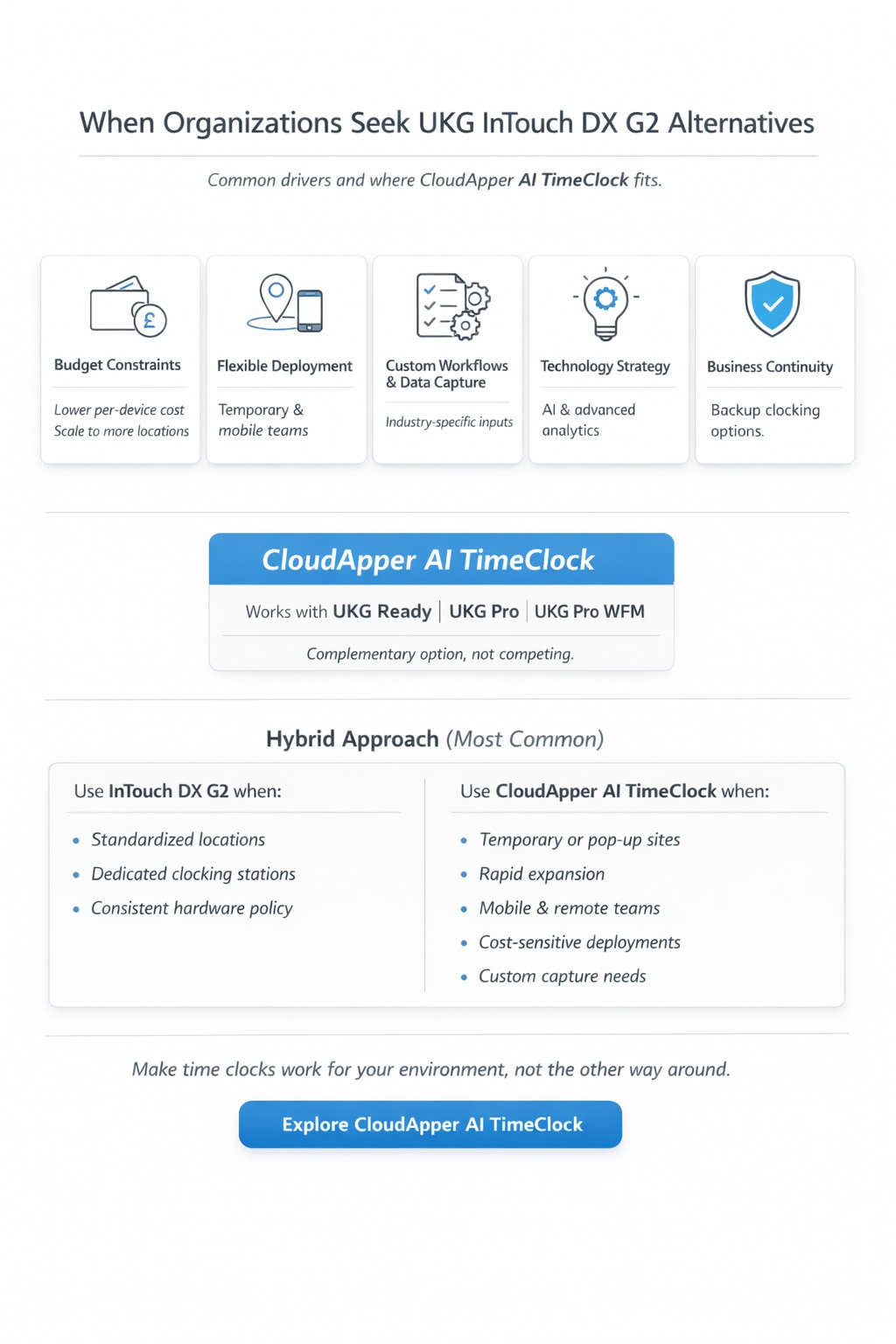
While the UKG InTouch DX G2 serves many organizations well, HR leaders often find themselves evaluating alternative time clock solutions for various legitimate operational, financial, and strategic reasons. Understanding these scenarios helps organizations make informed decisions about their time and attendance hardware strategy.
Budget Constraints and Cost Optimization
One of the most common drivers for exploring alternatives is budget optimization. Organizations often need time clocks across numerous locations—retail chains might require devices in dozens or hundreds of stores, healthcare systems need them across multiple facilities and departments, and manufacturing operations require coverage across various production areas.
The capital expense of deploying UKG InTouch DX G2 devices at scale can represent a significant investment. For a retail chain operating 50 locations with an average of 3 time clock locations per store, the hardware costs alone can reach six figures. Similarly, a healthcare system with multiple hospitals, clinics, and departments might need dozens of devices to provide adequate coverage.
Budget-conscious organizations may seek alternatives that provide essential time clock functionality at a lower per-device cost, enabling broader deployment without proportionally increased capital expenditure. This approach allows organizations to provide time clock access to more employees and locations while managing total cost of ownership.
Flexible Deployment Scenarios
Different operational environments present unique deployment challenges that may benefit from alternative approaches to time clocking:
Temporary Locations: Seasonal retail operations, temporary healthcare facilities, construction sites, or event staffing require time clock capabilities for limited durations. Investing in permanent hardware for temporary locations often doesn’t make economic sense.
Rapid Expansion: Organizations experiencing rapid growth need to deploy time clock capabilities quickly as new locations open or departments expand. Solutions that can be deployed rapidly without hardware procurement and installation delays provide operational advantages.
Remote Work Locations: Field service technicians, home healthcare workers, traveling nurses, and other mobile employees need time clock access but don’t work from fixed locations where physical time clocks can be installed.
Diverse Location Types: Organizations with a mix of large facilities and small satellite offices may need different time clock approaches for different locations. A one-size-fits-all hardware strategy may not optimize for all scenarios.
Bring Your Own Device Environments: Some organizations encourage or permit employees to use personal smartphones for work-related functions, creating opportunities to leverage existing devices rather than deploying dedicated hardware.
Customization and Extended Functionality Requirements
Organizations often discover unique operational requirements that extend beyond standard time clock functionality:
Industry-Specific Data Capture: Healthcare organizations might need to capture patient care units, retail operations might require department or register assignments, and manufacturing facilities might need job costing or production tracking data at the time clock.
Custom Attestations and Compliance: Beyond standard policy acknowledgments, organizations may need to capture industry-specific attestations, safety confirmations, or compliance acknowledgments that require custom configuration.
Integration with Other Systems: Some organizations need their time clock solution to interact with systems beyond UKG, such as access control systems, building management platforms, or industry-specific applications.
Unique Workflows: Organizations with specialized processes—such as split shifts, complex meal break requirements, or unique approval workflows—may need time clock solutions that can be configured to support these specific scenarios.
Multi-Language Support: Organizations with diverse workforces may need extensive multi-language capabilities that can be customized to their specific employee demographics.
Technology Strategy and Innovation
Forward-thinking organizations often seek time clock solutions that incorporate emerging technologies and capabilities:
Artificial Intelligence: AI-powered features such as conversational interfaces, intelligent scheduling suggestions, or predictive analytics may provide competitive advantages that justify exploring alternative solutions.
Advanced Analytics: Some organizations need more sophisticated reporting and analytics capabilities than standard time clock hardware provides, seeking solutions that can deliver actionable insights from time and attendance data.
User Experience Innovation: Organizations focused on employee experience may seek time clock solutions with exceptionally intuitive interfaces, mobile-first design, or consumer-grade user experience that exceeds traditional time clock expectations.
Disaster Recovery and Business Continuity
Organizations with robust business continuity requirements may need backup time clock capabilities that can be activated quickly if primary systems become unavailable due to hardware failure, network outages, or disaster scenarios. Having alternative time clock options provides operational resilience.
CloudApper AI TimeClock: A Comprehensive Alternative
The CloudApper AI TimeClock represents a modern approach to time and attendance hardware, designed specifically to work seamlessly with UKG Ready, Pro, and Pro WFM while addressing the diverse scenarios where organizations seek time clock alternatives.
Rather than positioning this solution as competing with the UKG InTouch DX G2, CloudApper AI TimeClock serves as a complementary option that organizations can deploy alongside or instead of traditional hardware based on their specific operational requirements and constraints. Many organizations successfully employ a hybrid approach, using UKG InTouch DX G2 devices in some locations or scenarios while leveraging CloudApper AI TimeClock in others.
The CloudApper Approach to Time Clocking
CloudApper AI TimeClock transforms standard tablets or existing devices into fully-functional UKG time clocks through software, eliminating the need for specialized hardware while maintaining all essential time and attendance capabilities. This approach provides organizations with flexibility, cost advantages, and innovation opportunities while preserving the tight UKG integration critical for accurate workforce management.
The solution maintains real-time connectivity with UKG systems, ensuring that punches, schedule information, and employee data remain synchronized. From the UKG system’s perspective, CloudApper AI TimeClock functions identically to other time capture methods, maintaining data integrity and supporting existing UKG workflows and business rules.
CloudApper AI TimeClock as an Affordable Alternative
For organizations seeking cost-effective time clock deployment across multiple locations or departments, CloudApper AI Timeclock provides significant economic advantages while maintaining robust functionality.
Hardware Cost Reduction
The most immediate financial benefit comes from hardware cost reduction. Rather than investing in specialized time clock terminals, organizations can deploy CloudApper AI TimeClock on commercial tablets that cost a fraction of dedicated time clock hardware. A quality Android tablet suitable for time clock use typically costs $200-400, compared to significantly higher costs for specialized time clock terminals.
For organizations needing to deploy dozens or hundreds of time clocks, this cost differential creates substantial savings. A retail chain deploying 100 time clock locations might reduce capital expenditure by tens of thousands of dollars, freeing budget for other strategic initiatives.
Total Cost of Ownership Advantages
Beyond initial hardware costs, total cost of ownership considerations favor the software-based approach:
Replacement Costs: When hardware fails or becomes obsolete, replacing a commercial tablet costs significantly less than replacing specialized time clock equipment. The rapid pace of tablet evolution also means replacement devices often offer improved capabilities at lower costs.
Maintenance and Support: Standard tablets can be repaired or replaced locally, while specialized time clock hardware may require vendor-specific service. The ubiquity of tablet technology means IT teams already possess relevant support expertise.
Upgrade Flexibility: As software evolves, CloudApper AI TimeClock gains new features and capabilities through updates without requiring hardware replacement. Organizations benefit from continuous improvement without additional capital investment.
Scalability Economics: Organizations can scale time clock deployment up or down quickly without significant financial commitment, supporting business growth or contraction without stranded hardware investment.
Budget Optimization Strategies
The cost advantages of CloudApper AI TimeClock enable several budget optimization strategies:
Broader Deployment: Organizations can provide time clock access to more employees and locations than would be feasible with higher-cost hardware, improving employee experience and reducing administrative burden.
Phased Implementation: Lower per-device costs support phased rollouts where organizations can deploy time clocks incrementally as budget allows, rather than requiring large upfront investments.
Test and Learn: Organizations can pilot new time clock approaches in select locations with minimal financial risk, validating effectiveness before broader deployment.
Mixed Deployment: Organizations can strategically deploy premium hardware where it provides maximum value while using cost-effective alternatives in other scenarios, optimizing overall spend.
AI-Powered Functionality: Intelligence Meets Time Tracking
CloudApper AI TimeClock incorporates artificial intelligence capabilities that extend beyond traditional time clock functionality, providing organizations with innovative tools for workforce management.
Conversational AI Interface
One of the most distinctive features is the conversational AI interface that allows employees to interact with the time clock using natural language. Rather than navigating menu systems, employees can simply speak or type requests:
“Clock me in for my shift” “How many vacation days do I have?” “What’s my schedule this week?” “I need to request tomorrow off”
This conversational approach reduces training requirements, improves user experience, and makes time clock interactions faster and more intuitive, particularly for employees who may struggle with traditional menu-driven interfaces.
Intelligent Facial Recognition
While traditional biometric time clocks offer fingerprint or facial recognition, CloudApper AI TimeClock leverages advanced AI-powered facial recognition that works reliably across diverse lighting conditions and employee populations. The system continuously improves recognition accuracy through machine learning, adapting to changes in employee appearance over time.
The facial recognition operates quickly enough for high-traffic scenarios like shift changes where dozens of employees need to clock in within a short timeframe, while maintaining security against spoofing attempts.
Predictive and Proactive Features
AI capabilities enable proactive workforce management features:
Anomaly Detection: The system can identify unusual punch patterns that might indicate errors, buddy punching, or compliance issues, alerting supervisors to investigate.
Intelligent Reminders: Employees receive timely reminders about upcoming shifts, required attestations, or pending time-off requests based on learned patterns and organizational rules.
Schedule Optimization: AI analyzes historical patterns to suggest optimal schedules that balance operational needs with employee preferences.
Compliance Monitoring: The system monitors time and attendance data for potential compliance issues such as missed breaks, excessive hours, or minor overtime, enabling proactive intervention.
Natural Language Processing for HR Queries
Beyond basic time clock functions, the AI-powered interface serves as a front-line HR service delivery channel. Employees can ask questions about policies, benefits, and procedures, receiving instant, accurate responses drawn from organizational knowledge bases. This capability reduces routine inquiries to HR staff while improving employee access to information.
Continuous Learning and Improvement
The AI components of CloudApper AI TimeClock continuously learn from usage patterns, user interactions, and organizational feedback. Over time, the system becomes more accurate in facial recognition, more helpful in responding to queries, and more effective at predicting organizational needs.
Portability and Deployment Flexibility
CloudApper AI TimeClock’s software-based architecture provides deployment flexibility that addresses numerous operational scenarios where traditional fixed hardware presents limitations.
Rapid Deployment Capabilities
Organizations can deploy CloudApper AI TimeClock locations in hours rather than the days or weeks often required for traditional time clock installation. The process simply involves configuring a tablet with the CloudApper application and connecting to your UKG environment. No specialized installation, wiring, or configuration is required.
This rapid deployment capability supports several important scenarios:
New Location Openings: Retail stores, clinics, or facilities can have time clock capabilities operational immediately upon opening, without waiting for hardware procurement and installation.
Emergency Response: When unexpected situations require additional time clock capacity—such as disaster response, pandemic screening stations, or emergency operations—CloudApper AI TimeClock can be deployed immediately.
Testing and Pilots: Organizations can test new time clock approaches, workflows, or locations without significant lead time, enabling faster innovation and optimization.
Temporary and Seasonal Deployments
Organizations with temporary workforce management needs benefit tremendously from CloudApper AI TimeClock’s portability:
Seasonal Retail: Holiday shopping seasons, back-to-school periods, or other seasonal peaks often require temporary time clock capacity that can be deployed and removed as needed.
Event Staffing: Organizations managing events, conferences, or temporary operations can deploy time clock capabilities for the duration of the event without permanent hardware investment.
Project-Based Work: Construction sites, temporary facilities, or project-based operations need time clock capabilities for defined periods without long-term hardware commitments.
Pop-Up Locations: Retail pop-up stores, temporary clinics, or short-term facilities can have full time clock functionality without the cost and complexity of permanent installations.
Mobile and Remote Worker Support
CloudApper AI TimeClock can be deployed on mobile devices, enabling time tracking for employees who work outside traditional facilities:
Field Service Technicians: Workers who travel to customer locations can clock in and out from their work sites, capturing location data for verification and routing optimization.
Home Healthcare Workers: Nurses and caregivers visiting patients can clock in at the point of care, ensuring accurate time tracking while documenting service locations.
Traveling Employees: Sales representatives, consultants, or other traveling workers can maintain accurate time records regardless of location.
Remote Work: Employees working from home or remote locations can use the same time clock interface as on-site employees, maintaining consistency while supporting flexible work arrangements.
Multi-Site Organizations
Organizations operating across numerous locations benefit from CloudApper AI TimeClock‘s flexible deployment model:
Consistent Experience: All locations can provide identical time clock functionality regardless of size, ensuring consistent employee experience across the organization.
Centralized Management: IT and HR teams can manage all time clock deployments from a central console, regardless of geographic distribution.
Location-Specific Configuration: While maintaining consistency, each location can implement customizations relevant to local requirements, regulations, or workflows.
Scalable Architecture: Organizations can add or remove time clock locations without significant capital investment or procurement delays.
Customization: Tailoring Time Clocks to Your Needs
CloudApper AI TimeClock’s software-based architecture enables extensive customization that allows organizations to configure time clock functionality to match their specific operational requirements, workflows, and compliance needs.
Industry-Specific Data Capture
Different industries require different information at the time clock. CloudApper AI TimeClock can be configured to capture industry-specific data:
Healthcare: Capture patient care units, departments, or cost centers. Record certifications or specialties for skill-based scheduling. Document care activities or patient identifiers for billing integration.
Retail: Assign employees to specific registers, departments, or sales areas. Track commission-eligible activities or sales associates. Capture tip amounts for hospitality operations.
Manufacturing: Record job numbers, work orders, or production batches. Track machine assignments or quality checkpoints. Capture safety compliance confirmations or tooling assignments.
Education: Identify school buildings, programs, or special events. Track substitute assignments or extracurricular supervision. Record transportation duties or special assignments.
This customizable data capture ensures that time clock interactions support broader operational and financial management requirements beyond basic time tracking.
Custom Attestations and Confirmations
Organizations can configure custom attestations that employees must acknowledge during clock-in or clock-out:
Safety Confirmations: Manufacturing and healthcare organizations can require employees to confirm they’ve reviewed safety protocols, completed equipment inspections, or verified protective equipment.
Policy Acknowledgments: Ensure employees acknowledge policy updates, training completions, or procedural changes at the time clock.
Health Screenings: Configure health screening questions or attestations required before employees can begin their shifts.
Compliance Declarations: Capture required compliance confirmations such as break acknowledgments, schedule reviews, or regulatory attestations.
These customizable attestations ensure critical confirmations occur at the point of time capture, creating documented records integrated directly into your UKG system.
Workflow Customization
CloudApper AI TimeClock supports configuration of custom workflows that match your operational processes:
Multi-Step Punches: Configure time clocks to require multiple steps such as department selection, task assignment, or supervisor approval before punches are finalized.
Conditional Logic: Implement conditional workflows where time clock behavior changes based on employee role, location, shift time, or other variables.
Approval Routing: Configure custom approval workflows for exception requests, schedule changes, or time-off requests initiated at the time clock.
Integration Points: Connect time clock interactions with other systems such as access control, building management, or industry-specific applications.
User Interface Customization
The time clock interface itself can be customized to match organizational branding and preferences:
Branding: Apply organizational logos, colors, and branding to create a consistent visual experience.
Language Options: Configure multi-language support with specific languages relevant to your workforce demographics.
Button Layout: Customize button arrangements, labels, and workflows to match how your employees think about time clock interactions.
Information Display: Configure what information employees see during clock-in, such as upcoming shifts, accrual balances, or organizational announcements.
Custom Reporting and Analytics
CloudApper AI TimeClock can be configured to generate custom reports and analytics specific to your organizational needs:
Department-Specific Metrics: Track and report time and attendance data in ways that match your organizational structure and reporting requirements.
Compliance Reporting: Generate reports formatted to meet specific regulatory or audit requirements.
Operational Analytics: Create dashboards and reports that provide insights into labor utilization, schedule adherence, or workforce productivity.
Exception Management: Configure custom exception reports that identify situations requiring management attention based on your specific business rules.
Self-Service and HR Service Delivery Kiosk Functionality
CloudApper AI TimeClock extends far beyond basic time punches to serve as a comprehensive employee self-service and HR service delivery platform, reducing administrative burden on HR teams while empowering employees.
Comprehensive Self-Service Capabilities
Employees can perform numerous HR and workforce management tasks directly at the time clock without requiring computer access or HR assistance:
Schedule Management: View upcoming shifts, request shift trades with qualified colleagues, bid on open shifts, or confirm scheduled shifts—all from the time clock interface.
Time-Off Requests: Initiate time-off requests, view accrual balances, check pending requests, or review time-off policies directly at the time clock.
Timecard Review: Employees can view their punches, review hours worked, identify exceptions, and submit corrections if needed, reducing payroll errors and disputes.
Personal Information Updates: Update contact information, emergency contacts, or other personal data that flows directly into UKG.
Document Access: View pay stubs, tax forms, benefit information, or company policies without requiring HR assistance.
Benefits Enrollment: During open enrollment periods, employees can review benefit options and make elections through the time clock kiosk.
HR Query Resolution
The AI-powered conversational interface transforms the time clock into an HR information desk:
Policy Questions: Employees can ask questions about HR policies, procedures, or benefits and receive accurate, instant responses drawn from organizational knowledge bases.
Procedural Guidance: Receive step-by-step guidance for HR processes such as filing claims, updating information, or accessing services.
Status Inquiries: Check the status of pending requests, applications, or processes without contacting HR.
FAQ Access: Access answers to frequently asked questions about compensation, benefits, workplace policies, or organizational information.
This self-service capability dramatically reduces routine inquiries to HR staff, allowing HR teams to focus on strategic initiatives rather than answering repetitive questions.
Manager Self-Service
CloudApper AI TimeClock can also provide manager-specific functionality:
Approval Workflows: Managers can approve time-off requests, schedule changes, or timecard adjustments directly from the time clock interface.
Team Visibility: View team schedules, attendance patterns, or exception reports without accessing a computer.
Quick Actions: Perform common management tasks such as schedule adjustments, shift assignments, or employee communications.
Communication Hub
The time clock serves as a communication channel between the organization and employees:
Announcements: Display organizational announcements, policy updates, or important information when employees clock in.
Personalized Messages: Deliver targeted messages to specific employees or groups based on role, department, or other criteria.
Emergency Communications: Rapidly communicate urgent information to employees as they interact with time clocks across your organization.
Training Reminders: Notify employees of required training, certification renewals, or compliance requirements.
Benefits of Kiosk Functionality
Transforming time clocks into self-service kiosks delivers multiple organizational benefits:
Reduced HR Workload: Routine inquiries and transactions handled through self-service reduce demands on HR staff, allowing focus on strategic priorities.
Improved Employee Experience: Employees appreciate immediate access to information and services without waiting for HR availability or navigating complex systems.
Increased Accuracy: Self-service reduces data entry errors and ensures employees have direct control over their information.
24/7 Availability: Employees can access HR services during their scheduled shifts regardless of HR office hours, particularly valuable for organizations with 24/7 operations.
Cost Efficiency: Expanding HR services without proportionally expanding HR headcount improves organizational efficiency.
Integration with UKG Systems
Seamless integration with UKG Ready, Pro, and Pro WFM is fundamental to CloudApper AI TimeClock’s value proposition. The solution is purpose-built to work as a natural extension of your UKG environment.
Real-Time Data Synchronization
CloudApper AI TimeClock maintains continuous connectivity with your UKG system, ensuring real-time data synchronization:
Immediate Punch Recording: Clock punches are transmitted to UKG instantly, ensuring managers have real-time visibility into employee attendance.
Schedule Updates: Changes to schedules in UKG are immediately reflected at the time clock, ensuring employees always see current information.
Employee Data: Changes to employee information, roles, or assignments in UKG automatically update time clock configurations and permissions.
Accrual Information: Time-off balances and accrual information displayed at the time clock reflect real-time UKG data.
UKG Business Rule Compliance
CloudApper AI TimeClock respects and enforces UKG business rules:
Overtime Rules: The system applies UKG-configured overtime rules when validating punches and notifying employees of overtime situations.
Break Requirements: Enforces configured meal and rest break requirements, preventing early punches or ensuring required breaks are taken.
Schedule Adherence: Validates punches against scheduled shifts, alerting employees to early arrivals, late starts, or missed punches.
Authorization Rules: Respects UKG permissions and authorization rules, ensuring employees can only perform actions they’re authorized for.
Workflow Integration
CloudApper AI TimeClock integrates with UKG workflows:
Approval Processes: Time-off requests, schedule changes, or exception corrections initiated at the time clock flow through configured UKG approval workflows.
Notification Systems: UKG notifications reach employees through the time clock interface, ensuring communication consistency.
Attestation Recording: Attestations captured at the time clock are documented in UKG, maintaining comprehensive audit trails.
Reporting Consistency
Data captured through CloudApper AI TimeClock appears in UKG reports identically to data captured through other methods, ensuring reporting consistency and eliminating parallel reporting requirements.
Implementation and Deployment
Organizations can deploy CloudApper AI TimeClock rapidly with minimal disruption to operations.
Implementation Process
Planning Phase: Identify locations and use cases for CloudApper AI TimeClock deployment. Determine customization requirements, workflows, and integration specifications.
Configuration: CloudApper configures the solution to match your UKG environment, organizational requirements, and desired customizations.
Testing: Validate functionality in test environments, ensuring seamless integration with UKG and proper configuration of custom workflows.
Deployment: Roll out CloudApper AI TimeClock to selected locations, providing employee orientation and manager training.
Optimization: Monitor usage, gather feedback, and refine configuration to optimize employee experience and operational efficiency.
Timeline Expectations
Most organizations complete CloudApper AI TimeClock implementation within 2-4 weeks from project initiation to production deployment. Simple configurations can go live even faster, while complex customizations requiring extensive workflow configuration may extend implementation timelines.
The software-based approach means organizations can implement incrementally, starting with pilot locations before broader rollout.
Training Requirements
CloudApper AI TimeClock’s intuitive interface minimizes training requirements:
Employee Training: Most employees can use basic time clock functionality after a brief orientation or short video tutorial. The conversational AI interface makes exploration and learning natural.
Manager Training: Managers may require slightly more extensive training to leverage approval workflows, reporting capabilities, and management features.
Administrator Training: HR and IT administrators receive comprehensive training on configuration, customization, and management capabilities.
Support Model
CloudApper provides comprehensive support:
Technical Support: Access to technical support for troubleshooting, configuration assistance, and issue resolution.
Training Resources: Documentation, video tutorials, and training materials to support ongoing user education.
Updates and Enhancements: Regular software updates deliver new features, security patches, and performance improvements without requiring hardware upgrades.
Security and Compliance
CloudApper AI TimeClock incorporates enterprise-grade security and compliance capabilities essential for workforce management.
Data Security
Encryption: All data transmission between time clocks and UKG systems uses encryption protocols, protecting employee information.
Secure Authentication: Multiple authentication methods including facial recognition, PINs, and badge readers prevent unauthorized access.
Access Controls: Granular permissions ensure employees can only access appropriate functionality and information.
Audit Trails: Comprehensive logging documents all time clock interactions, supporting compliance and investigation needs.
Compliance Support
Labor Law Compliance: Configurable to support various federal and state labor laws including break requirements, overtime rules, and minor work restrictions.
Industry Regulations: Customizable to address industry-specific regulations such as HIPAA for healthcare or food safety requirements for hospitality.
Audit Documentation: Maintains detailed records of attestations, policy acknowledgments, and compliance confirmations.
Privacy Protection
CloudApper AI TimeClock respects employee privacy while enabling effective workforce management:
Minimal Data Collection: Captures only data necessary for time tracking and configured organizational requirements.
Biometric Privacy: Facial recognition data is processed securely with appropriate protections for biometric information.
Data Retention: Configurable data retention policies ensure compliance with organizational and regulatory requirements.
Cost Considerations and Value
Understanding the financial implications of CloudApper AI TimeClock helps organizations make informed decisions.
Pricing Model
CloudApper typically uses a subscription pricing model based on the number of employees and deployed time clock locations. This predictable pricing makes budgeting straightforward and avoids large capital expenditures.
Pricing generally includes:
- Software licensing
- UKG integration
- Standard customization
- Updates and enhancements
- Technical support
Organizations purchase tablets separately, providing flexibility to choose devices that match their budget and requirements.
Return on Investment
Organizations realize ROI through multiple channels:
Hardware Cost Savings: Reduced time clock hardware costs compared to specialized terminals.
Administrative Efficiency: Self-service capabilities reduce HR workload and administrative time.
Improved Accuracy: Reduced payroll errors and time theft deliver direct cost savings.
Faster Deployment: Ability to deploy time clocks rapidly reduces opportunity costs and accelerates value realization.
Scalability: Easy addition of time clock locations supports business growth without proportional cost increases.
Most organizations achieve positive ROI within 6-12 months of deployment.
Frequently Asked Questions
Q: How does CloudApper AI TimeClock integrate with UKG systems?
A: CloudApper AI TimeClock connects to UKG Ready, Pro, and Pro WFM through standard APIs, ensuring real-time data synchronization. Punches, schedule information, and employee data flow seamlessly between systems, maintaining data integrity and supporting UKG workflows. The integration is purpose-built for UKG environments and thoroughly tested to ensure reliability.
Q: Can CloudApper AI TimeClock work offline if network connectivity is lost?
A: Yes, CloudApper AI TimeClock includes offline capabilities that allow employees to continue clocking in and out even if network connectivity is temporarily lost. Punches are stored locally and automatically synchronized with UKG once connectivity is restored, ensuring no time data is lost during network outages.
Q: What devices can CloudApper AI TimeClock run on?
A: CloudApper AI TimeClock runs on commercial Android tablets, iPads, and can be deployed on smartphones for mobile workers. This flexibility allows organizations to choose devices that match their budget and operational requirements. The solution works on devices organizations may already own or on new commercial tablets available from standard retailers.
Q: Is facial recognition secure and accurate?
A: CloudApper AI TimeClock uses advanced AI-powered facial recognition that provides high accuracy across diverse populations and lighting conditions. The system includes anti-spoofing protections and continuously improves through machine learning. Organizations concerned about biometric privacy can configure the system to use alternative authentication methods such as PINs or badge readers.
Q: How long does implementation take?
A: Most organizations deploy CloudApper AI TimeClock within 2-4 weeks from project initiation to production use. Simple deployments can go live even faster, while complex customizations may extend timelines. The software-based approach means organizations can implement incrementally, starting with pilot locations before broader deployment.
Q: Can we use CloudApper AI TimeClock alongside UKG InTouch DX G2 devices?
A: Absolutely. Many organizations use a hybrid approach, deploying UKG InTouch DX G2 where it provides maximum value while using CloudApper AI TimeClock in other scenarios. Both solutions integrate with UKG identically, allowing seamless coexistence. This hybrid strategy optimizes total cost of ownership while ensuring appropriate time clock coverage across all locations.
Q: What customizations are possible with CloudApper AI TimeClock?
A: CloudApper AI TimeClock supports extensive customization including custom data capture fields, industry-specific workflows, custom attestations and confirmations, branded interfaces, multi-language support, and custom reporting. The solution can be configured to match your unique operational requirements and compliance needs. CloudApper works with each organization to understand requirements and configure appropriate customizations.
Q: Does CloudApper AI TimeClock support multiple authentication methods?
A: Yes, the solution supports facial recognition, PIN codes, QR codes, badge readers, and other authentication methods. Organizations can configure which methods are available and can use different methods for different employee populations based on operational needs and preferences.
Q: What kind of support is provided?
A: CloudApper provides comprehensive support including technical support for troubleshooting, training resources for users and administrators, regular software updates, and guidance on optimization. Most subscription plans include support as a standard component, ensuring organizations have assistance when needed.
Q: Can CloudApper AI TimeClock support our multi-location, multi-state organization?
A: Yes, CloudApper AI TimeClock is designed for multi-location organizations and can be configured differently for different locations to accommodate varying state labor laws, operational requirements, or local preferences. Centralized management allows IT and HR teams to oversee all locations while maintaining location-specific configurations where needed.
Q: How does pricing compare to traditional time clock hardware?
A: CloudApper AI TimeClock typically provides significant cost savings compared to specialized time clock terminals. Organizations pay subscription fees based on employees and locations rather than large upfront hardware costs. When combined with commercial tablets, the total cost per time clock location is generally much lower than specialized hardware, with the added benefit of greater flexibility and more advanced features.
Q: What happens to our time clock capabilities if we decide to change HCM systems in the future?
A: While CloudApper AI TimeClock is optimized for UKG environments, the platform architecture allows adaptation to other HCM systems if needed. However, most organizations find that CloudApper AI TimeClock’s customization capabilities actually reduce the desire to change HCM systems, since they can configure UKG to work exactly as needed rather than seeking different platforms.
Conclusion: Choosing the Right Time Clock Strategy
The UKG InTouch DX G2 represents UKG’s commitment to providing comprehensive workforce management solutions, offering robust capabilities purpose-built for UKG environments. For many organizations, this native UKG solution serves as an excellent time clock choice that delivers enterprise-grade functionality with vendor support.
However, workforce management needs vary dramatically across organizations, industries, and operational scenarios. Budget constraints, deployment flexibility requirements, customization needs, and innovation goals all influence the optimal time clock strategy for each organization.
CloudApper AI TimeClock provides a complementary alternative that addresses scenarios where traditional time clock hardware presents challenges:
For budget-conscious organizations seeking to deploy time clocks across numerous locations, CloudApper AI TimeClock delivers essential functionality at significantly lower per-location costs, enabling broader deployment within budget constraints.
For organizations needing deployment flexibility, CloudApper AI TimeClock’s software-based approach supports rapid deployment, temporary installations, mobile workers, and diverse location types without hardware procurement delays or installation complexity.
For organizations requiring extensive customization, CloudApper AI TimeClock’s configurable architecture enables industry-specific data capture, custom workflows, unique attestations, and specialized reporting that match exact operational requirements.
For organizations pursuing innovation, CloudApper AI TimeClock’s AI-powered capabilities including conversational interfaces, intelligent facial recognition, and predictive features provide cutting-edge functionality that enhances employee experience and operational efficiency.
For organizations seeking expanded functionality, CloudApper AI TimeClock’s self-service and HR service delivery capabilities transform time clocks into comprehensive employee service kiosks that reduce HR workload while empowering employees.
Many organizations successfully employ hybrid strategies, using UKG InTouch DX G2 devices where they provide maximum value while leveraging CloudApper AI TimeClock in scenarios where alternative approaches offer advantages. This flexibility allows organizations to optimize their total workforce management technology investment.
The key to success lies in understanding your specific requirements across different operational scenarios and choosing time clock solutions that align with those needs. Whether that means standardizing on UKG InTouch DX G2, deploying CloudApper AI TimeClock throughout your organization, or implementing a strategic mix of both, the goal remains constant: providing employees with reliable, user-friendly time clock access while delivering accurate workforce data to your UKG system.
As you evaluate your time clock strategy, consider:
- Your budget for time clock deployment across all locations
- The diversity of your operational scenarios and location types
- Your customization requirements and unique workflows
- Your employees’ preferences and technology comfort levels
- Your IT resources and support capabilities
- Your timeline for deployment and need for flexibility
- Your strategic priorities around innovation and employee experience
CloudApper AI TimeClock stands ready to serve as your UKG time clock solution, whether deployed independently or alongside UKG InTouch DX G2 devices, ensuring your organization has the time and attendance capabilities needed to support operational excellence and workforce management success.
For HR leaders in healthcare, retail, manufacturing, and other industries using UKG Ready, Pro, or Pro WFM, exploring CloudApper AI TimeClock offers an opportunity to optimize time clock strategy, reduce costs, increase flexibility, and enhance employee experience—all while maintaining the seamless UKG integration essential for accurate workforce management.
Visit https://ukg.cloudapper.ai/affordable-ukg-kronos-time-clock/ to learn more about how CloudApper AI TimeClock can complement or enhance your UKG time and attendance capabilities.
One thought on “UKG InTouch DX G2 and its Alternatives: Exploring Your Time Clock Options”